> ## Documentation Index
> Fetch the complete documentation index at: https://developers.circle.com/llms.txt
> Use this file to discover all available pages before exploring further.
# User-controlled wallets client SDKs
> Client SDKs for embedding user-controlled wallets in web, iOS, Android, and React Native applications.
Circle's User-Controlled Wallets client SDKs let you embed user-controlled
wallets directly in your web and mobile applications. The SDKs handle key
management, authentication, confirmation UIs, and signing flows so that the
user's keyshares never leave the user's device. They pair with a server-side SDK
or direct API integration that orchestrates wallet operations from your backend.
## Choose your platform
## How it works
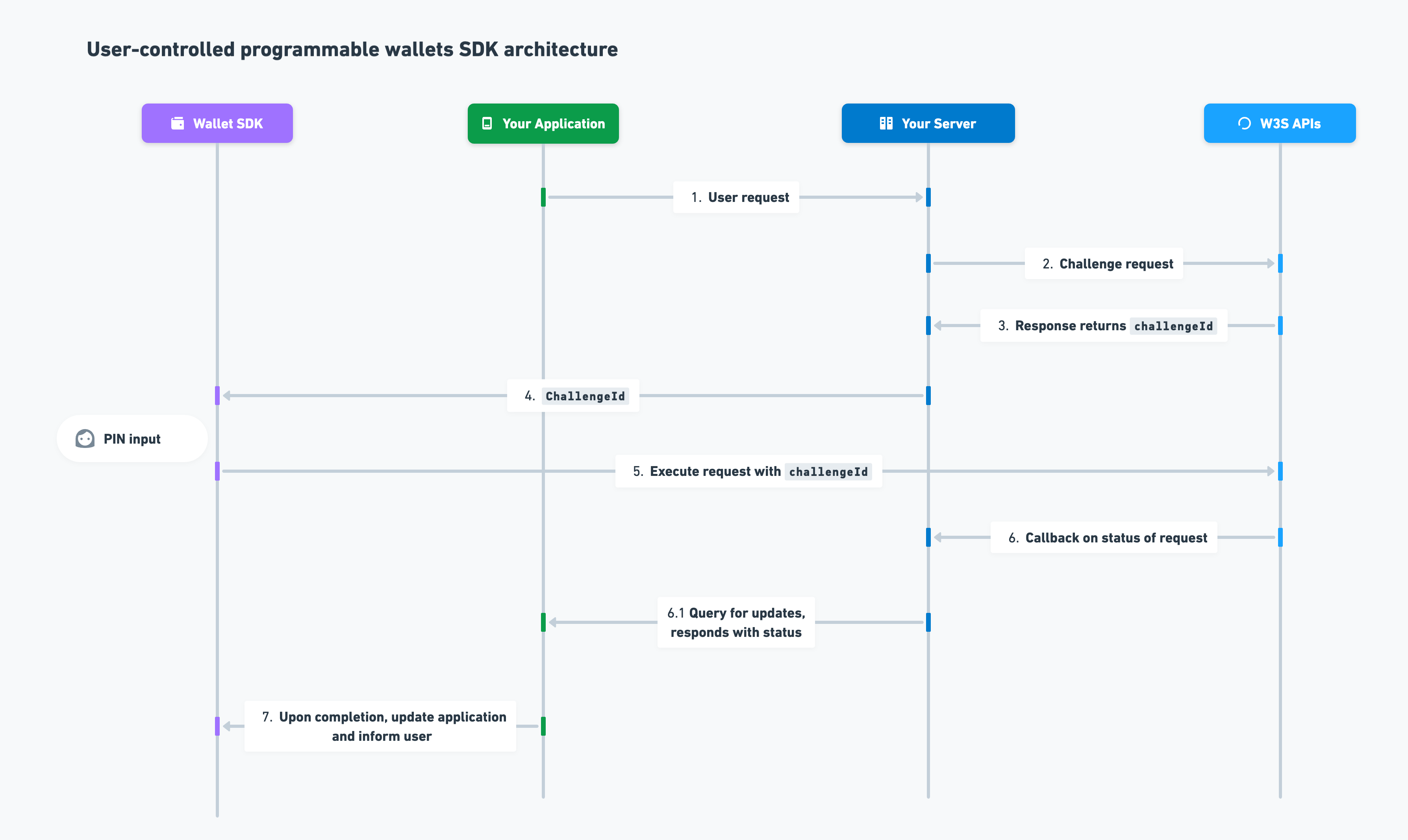 A client SDK call flows through Circle's APIs using a challenge ID that the user
authorizes on-device:
1. A user performs a wallet action in your application—for example, initiating a
USDC transfer.
2. Your server requests the action through Circle's User-Controlled Wallets REST
APIs.
3. The API returns a response containing a `challengeId`. The challenge must be
completed before the action executes.
4. Your server passes the `challengeId` to the client SDK. The SDK prompts the
user to authorize the action.
5. The user authorizes by entering their PIN, completing biometric verification,
or confirming on a Confirmation UI. The SDK encrypts the input and delivers
it to Circle.
6. Circle sends a webhook callback (or your server polls the corresponding `GET`
endpoint) with the action's status.
7. Your application notifies the end user that the action is complete.
## Security
Keyshares remain exclusively on the user's device and are never exposed to your
server or to Circle. The SDKs encrypt all request bodies in transit. The user
retains full control of their assets—neither your application nor Circle can
access funds without the user's authorization.
## UI customization
Each platform SDK ships with prebuilt UIs for PIN entry, security questions,
transaction confirmation, and message signing. Override colors, copy, layout,
and component styling to match your brand:
* [Confirmation UIs](/sdks/user-controlled/confirmation-uis)
* [Web SDK UI customizations](/sdks/user-controlled/web-sdk-ui-customizations)
* [iOS SDK UI customization API](/sdks/user-controlled/ios-sdk-ui-customization-api)
* [Android SDK UI customization API](/sdks/user-controlled/android-sdk-ui-customization-api)
* [React Native SDK UI customization API](/sdks/user-controlled/react-native-sdk-ui-customization-api)
## Server-side companion
The client SDK pairs with a server-side SDK that orchestrates wallet operations
from your backend. Use the Node.js or Python server SDK to create challenges,
manage wallet sets, and integrate with Circle's APIs:
* [Node.js SDK](/sdks/user-controlled-wallets-nodejs-sdk)
* [Python SDK](/sdks/user-controlled-wallets-python-sdk)
A client SDK call flows through Circle's APIs using a challenge ID that the user
authorizes on-device:
1. A user performs a wallet action in your application—for example, initiating a
USDC transfer.
2. Your server requests the action through Circle's User-Controlled Wallets REST
APIs.
3. The API returns a response containing a `challengeId`. The challenge must be
completed before the action executes.
4. Your server passes the `challengeId` to the client SDK. The SDK prompts the
user to authorize the action.
5. The user authorizes by entering their PIN, completing biometric verification,
or confirming on a Confirmation UI. The SDK encrypts the input and delivers
it to Circle.
6. Circle sends a webhook callback (or your server polls the corresponding `GET`
endpoint) with the action's status.
7. Your application notifies the end user that the action is complete.
## Security
Keyshares remain exclusively on the user's device and are never exposed to your
server or to Circle. The SDKs encrypt all request bodies in transit. The user
retains full control of their assets—neither your application nor Circle can
access funds without the user's authorization.
## UI customization
Each platform SDK ships with prebuilt UIs for PIN entry, security questions,
transaction confirmation, and message signing. Override colors, copy, layout,
and component styling to match your brand:
* [Confirmation UIs](/sdks/user-controlled/confirmation-uis)
* [Web SDK UI customizations](/sdks/user-controlled/web-sdk-ui-customizations)
* [iOS SDK UI customization API](/sdks/user-controlled/ios-sdk-ui-customization-api)
* [Android SDK UI customization API](/sdks/user-controlled/android-sdk-ui-customization-api)
* [React Native SDK UI customization API](/sdks/user-controlled/react-native-sdk-ui-customization-api)
## Server-side companion
The client SDK pairs with a server-side SDK that orchestrates wallet operations
from your backend. Use the Node.js or Python server SDK to create challenges,
manage wallet sets, and integrate with Circle's APIs:
* [Node.js SDK](/sdks/user-controlled-wallets-nodejs-sdk)
* [Python SDK](/sdks/user-controlled-wallets-python-sdk)