

- Static Resources customize the UI layout during build time.
- Programmatic Customization modifies the layout at run time.
Note:You can combine static and programmatic approaches for customization.
Layouts
How to Use the Layout Images and Index Tables
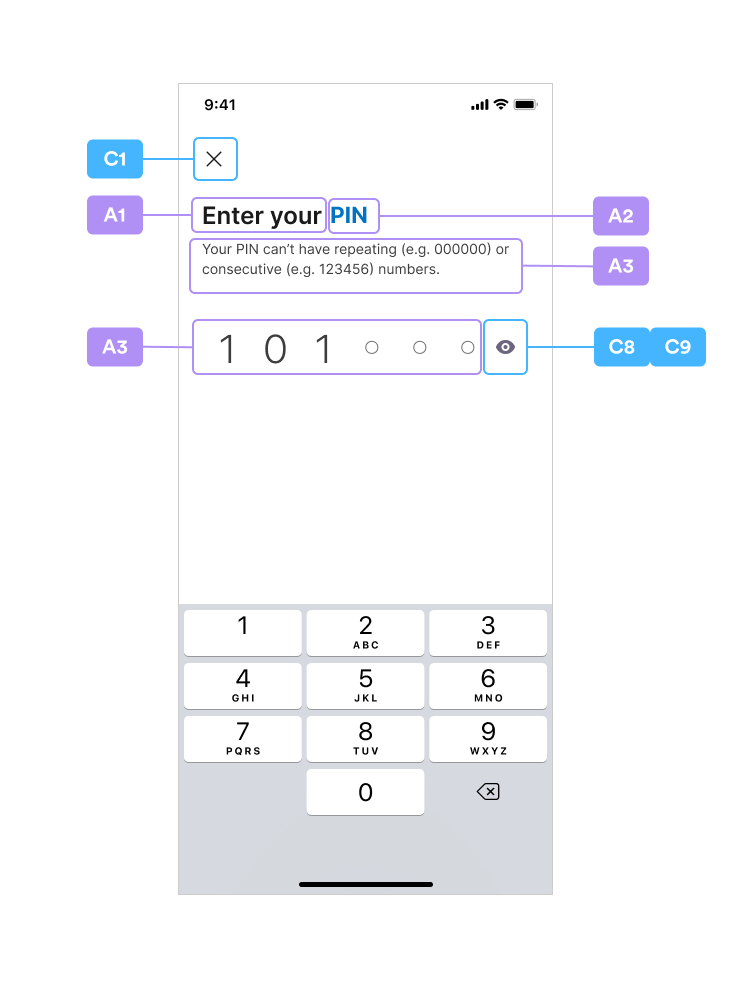
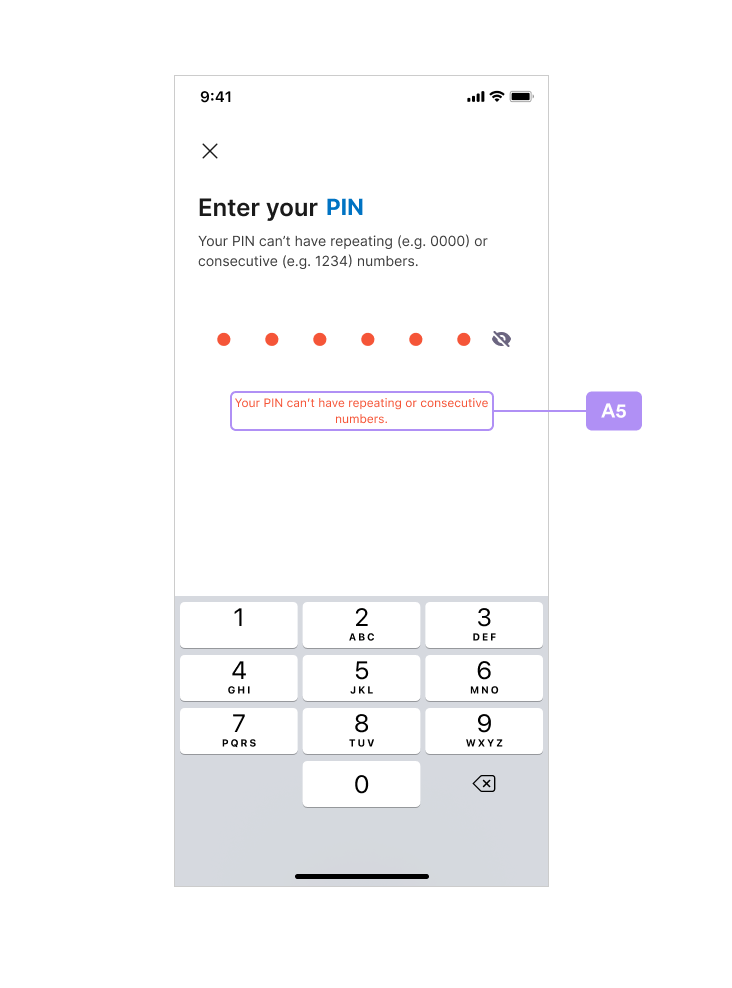
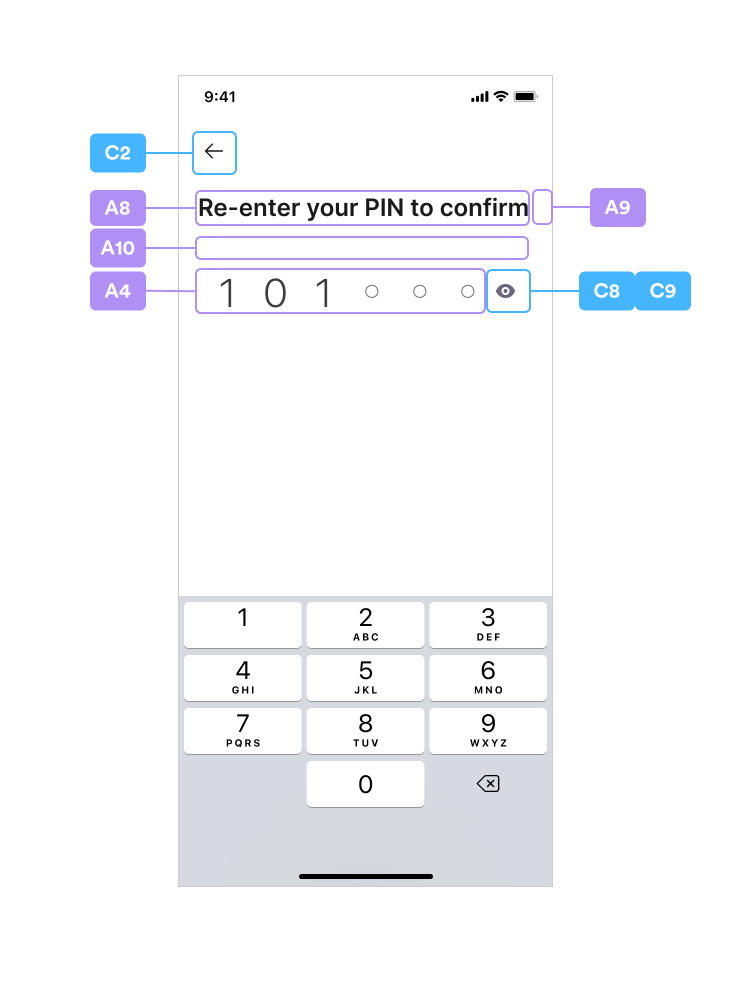
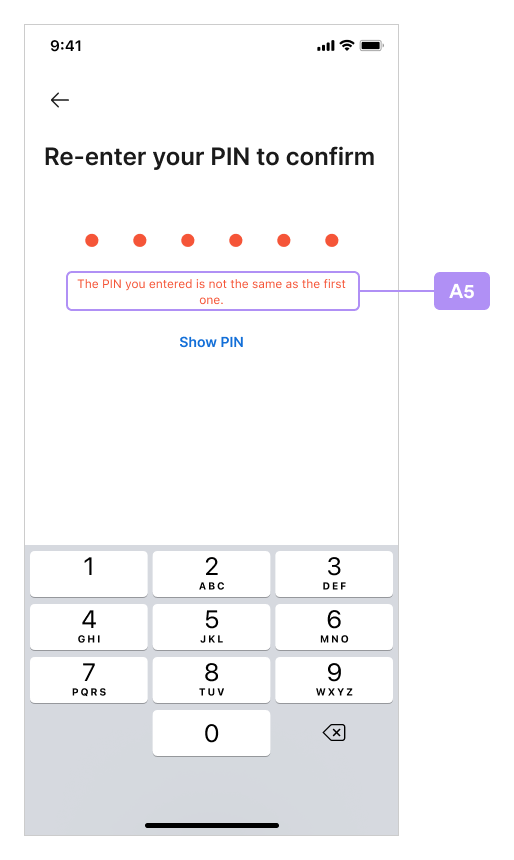
This section includes screenshots of layouts for the SDK functionality. As you review the layouts, you can cross-reference the alphanumeric tags in the images with the values in the index tables that follow this section:New PIN Code
Confirm PIN Code
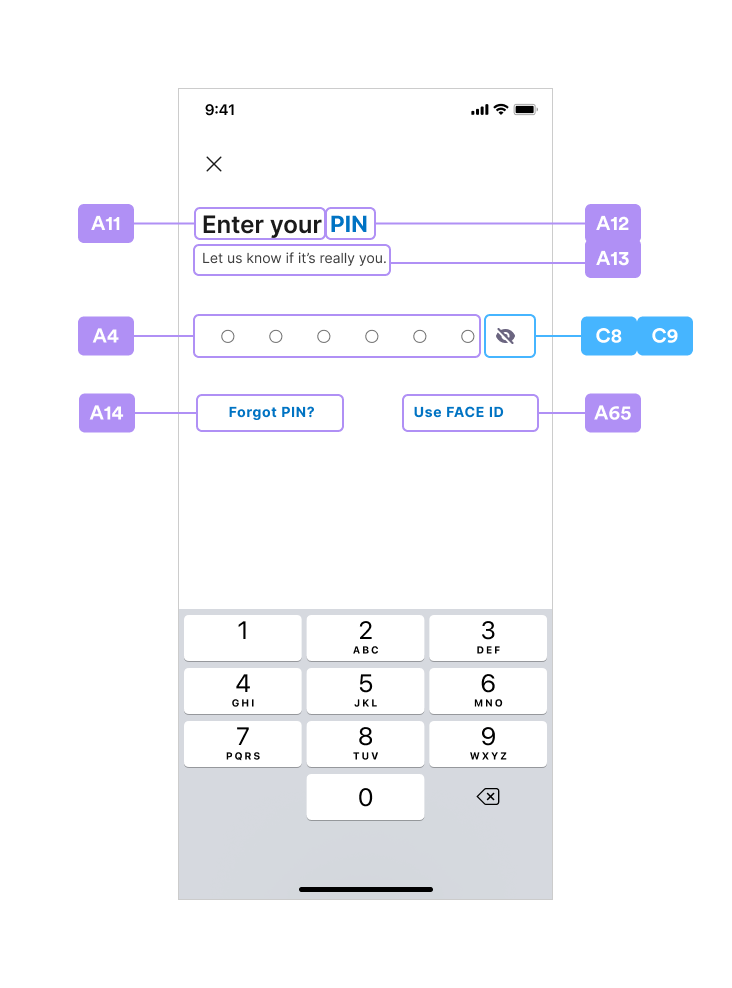
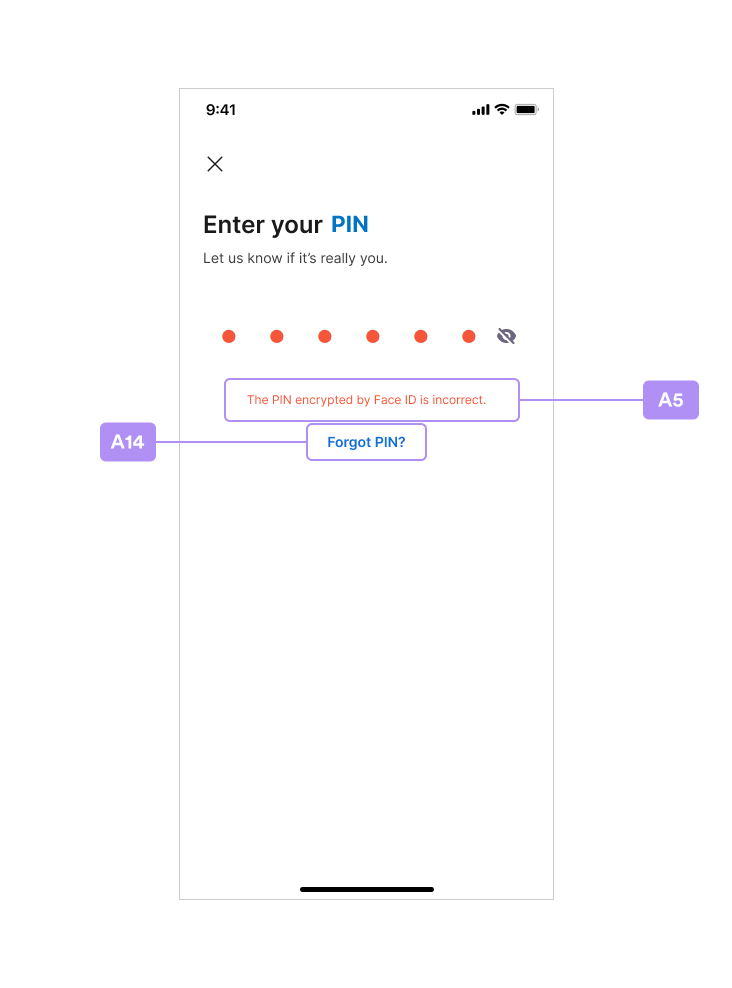
Enter PIN Code
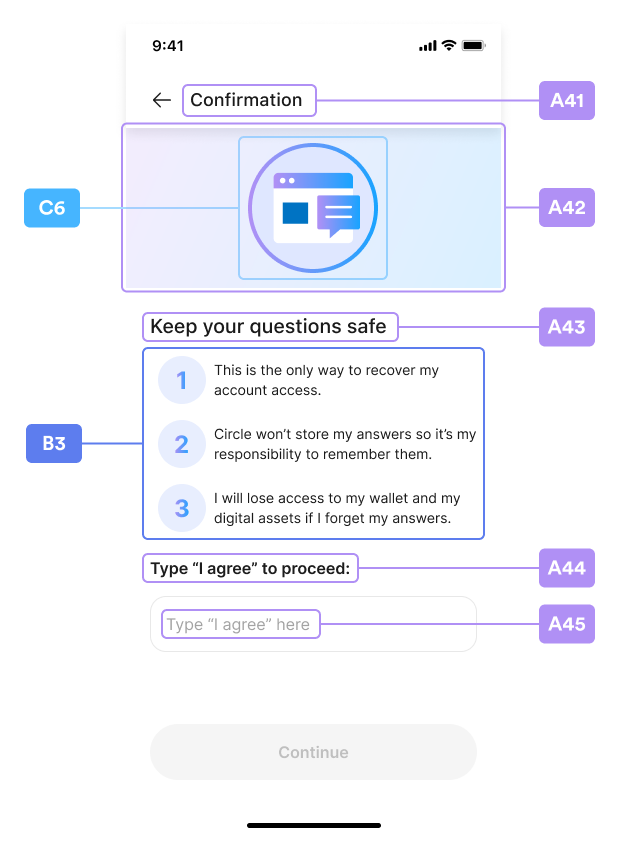
Security Intro
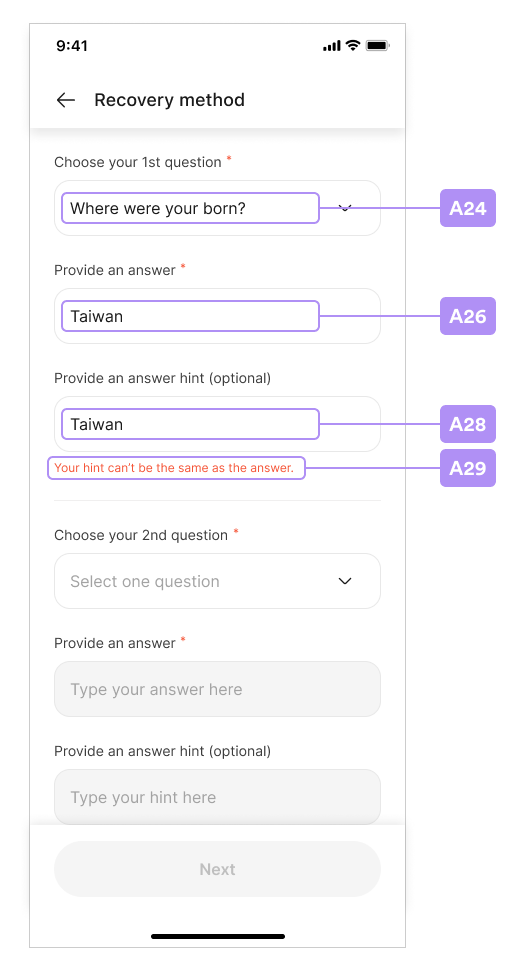
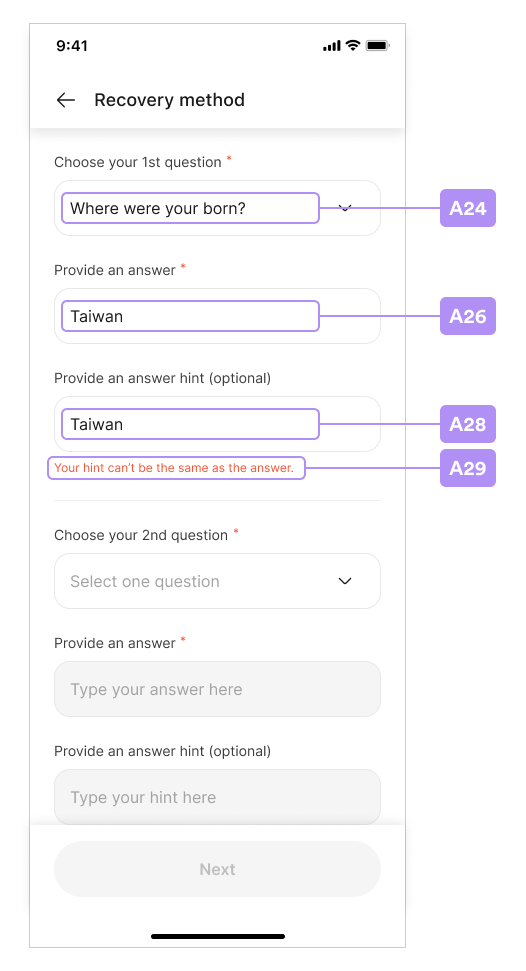
Security Questions
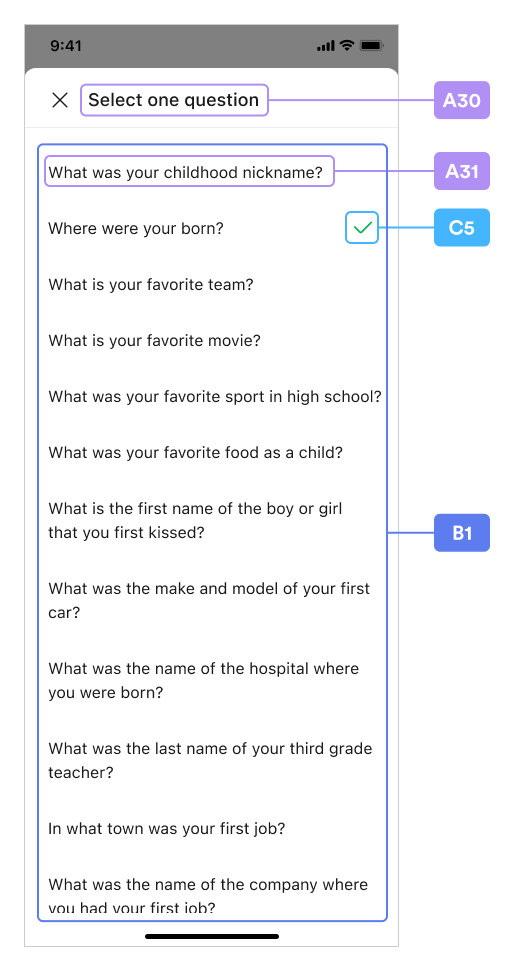
Select Question
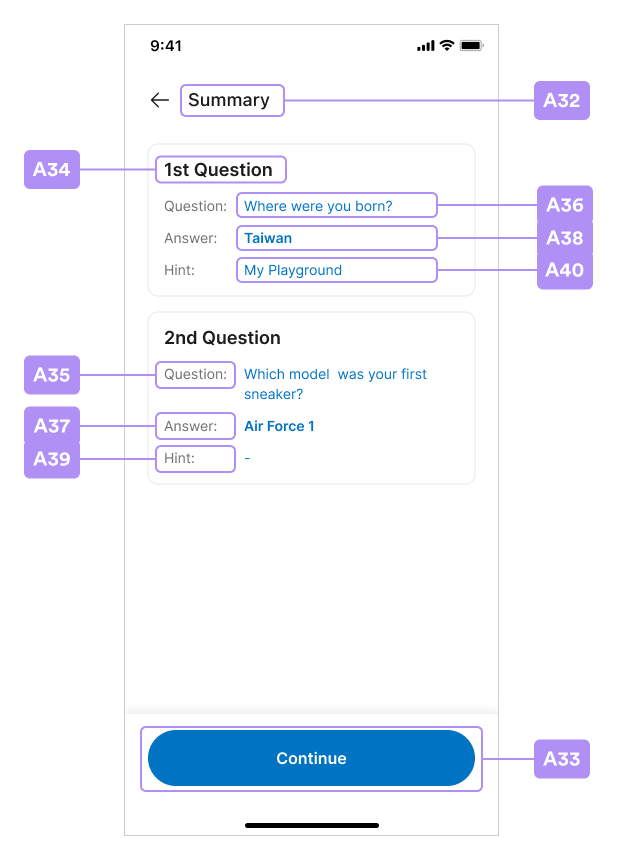
Security Summary
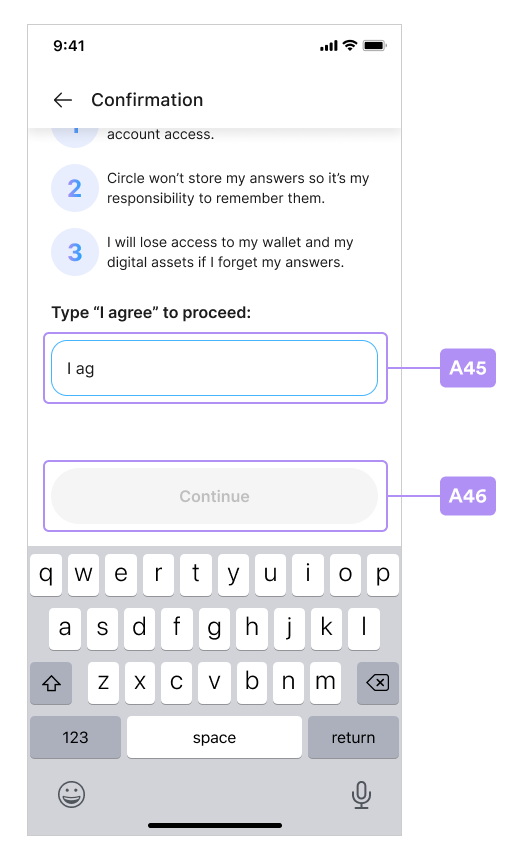
Security Confirm
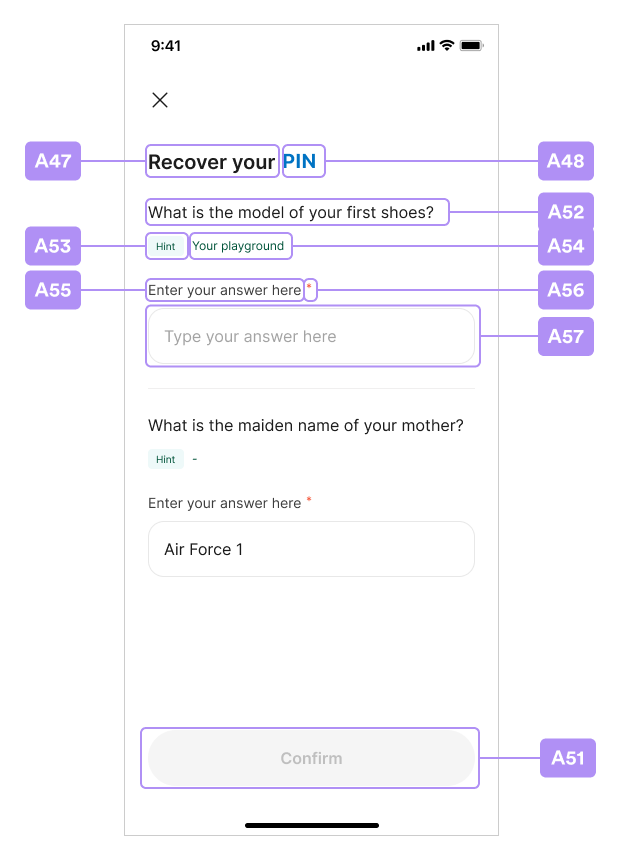
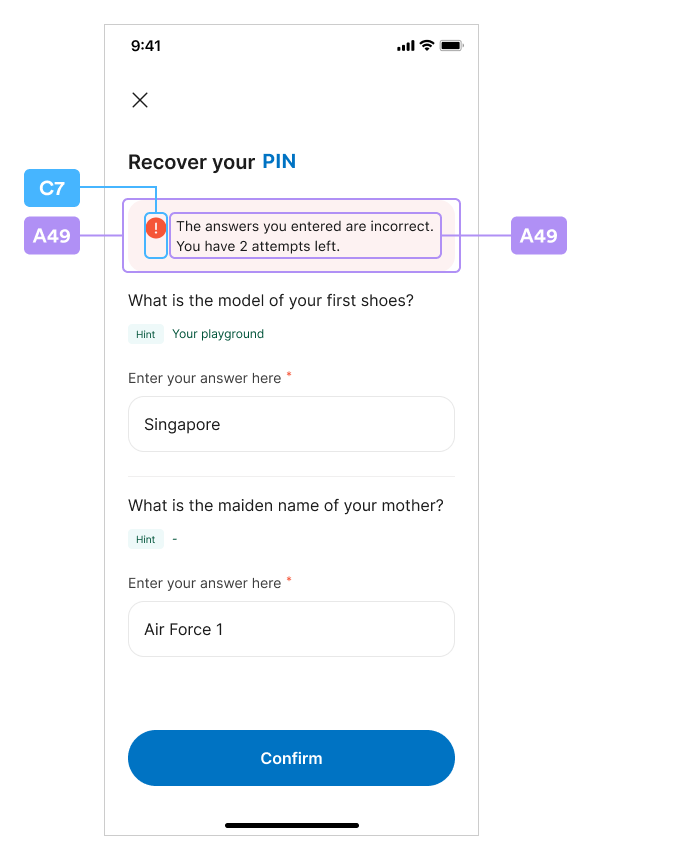
Recover PIN Code
Biometrics Setup
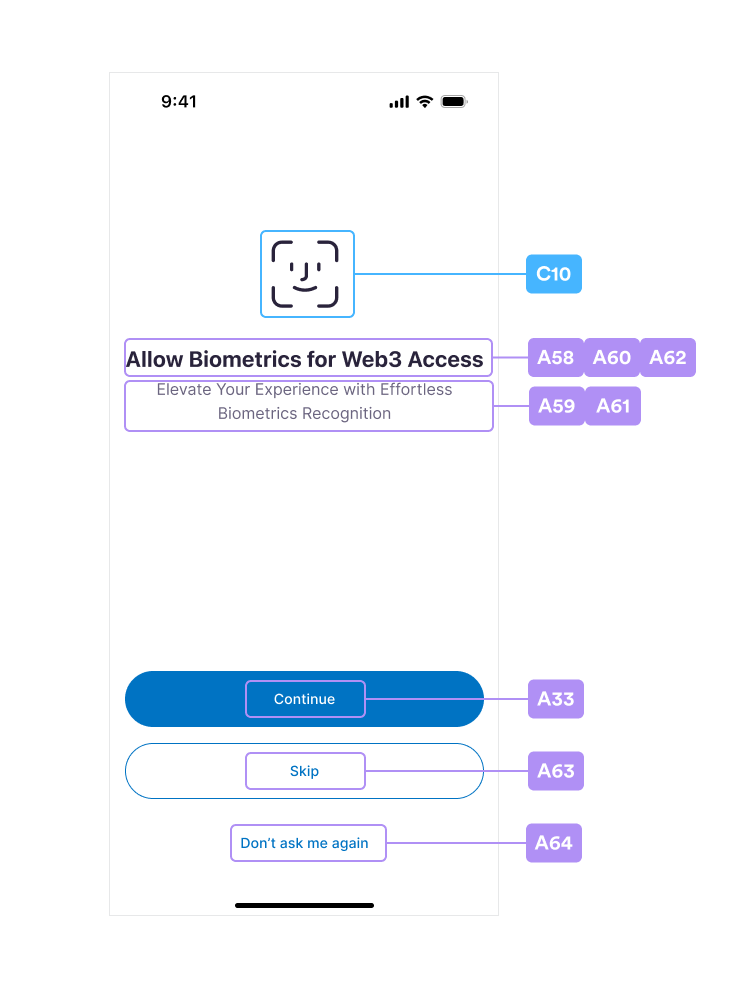
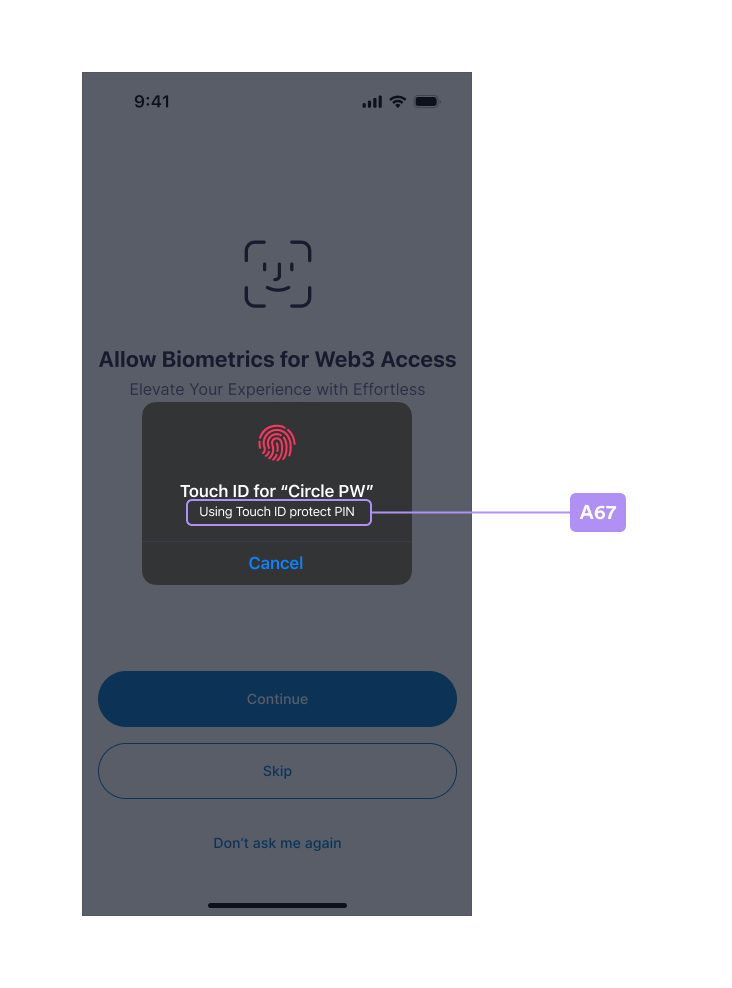
Touch ID Setup
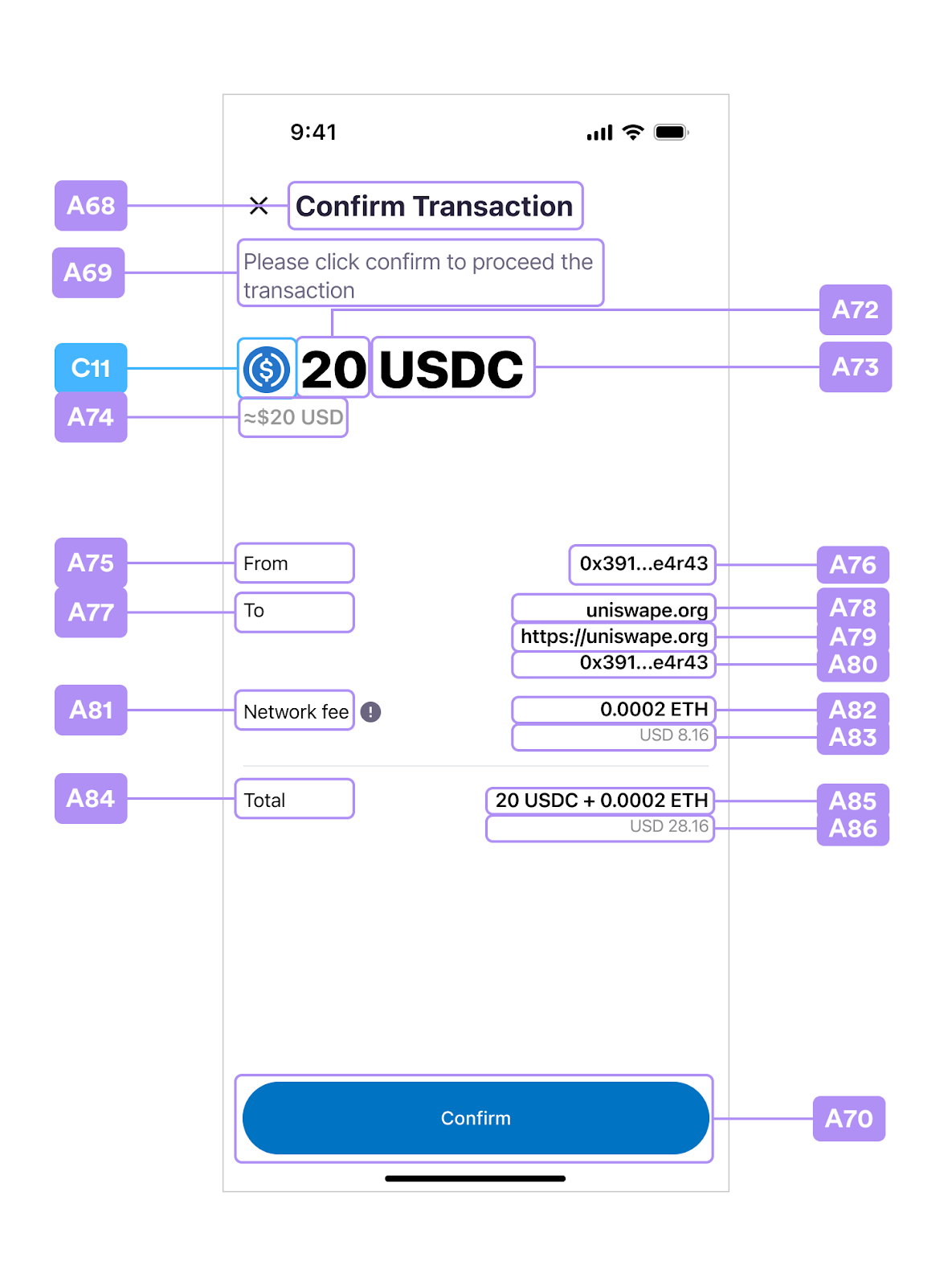
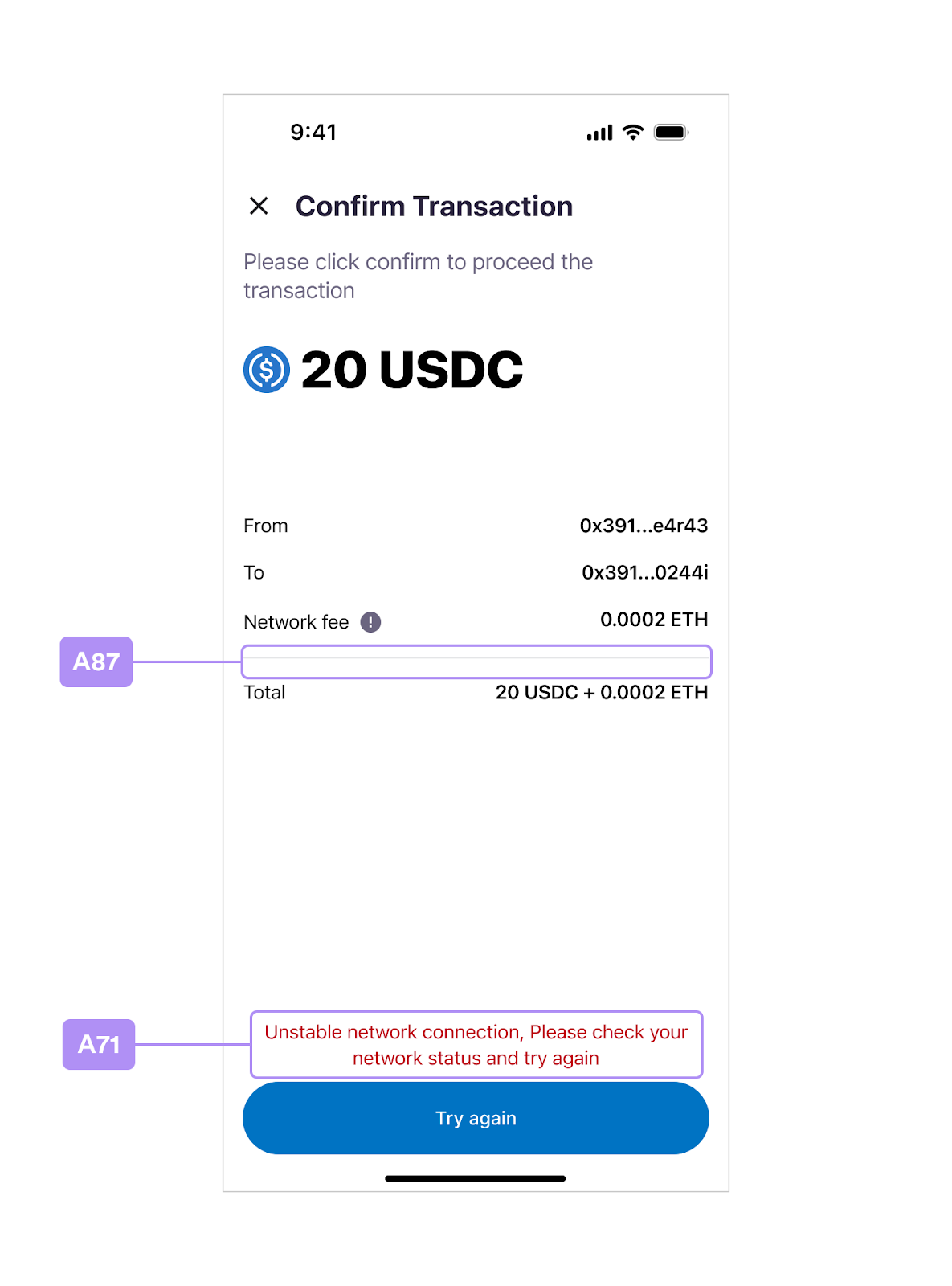
Confirm Transaction
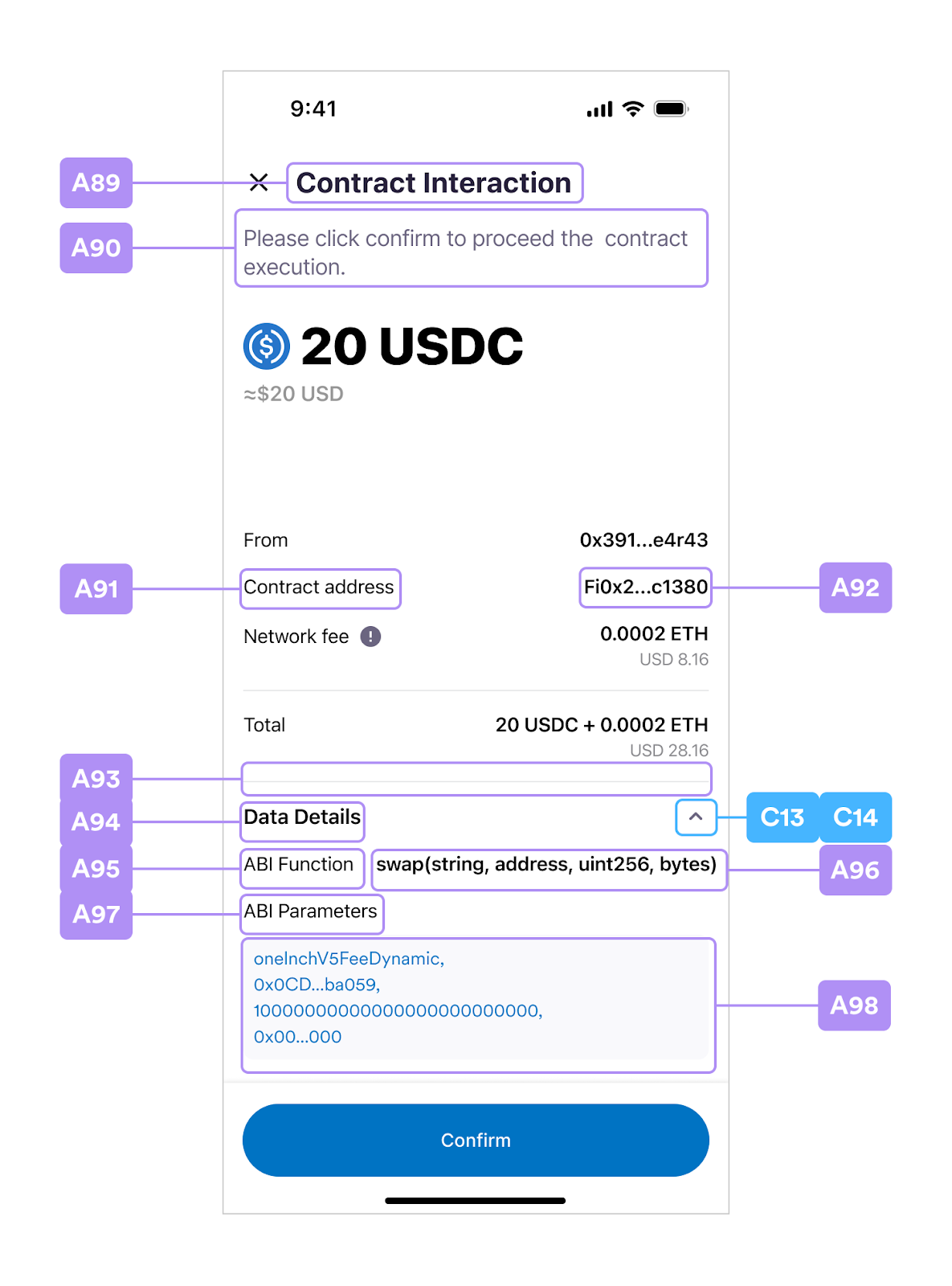
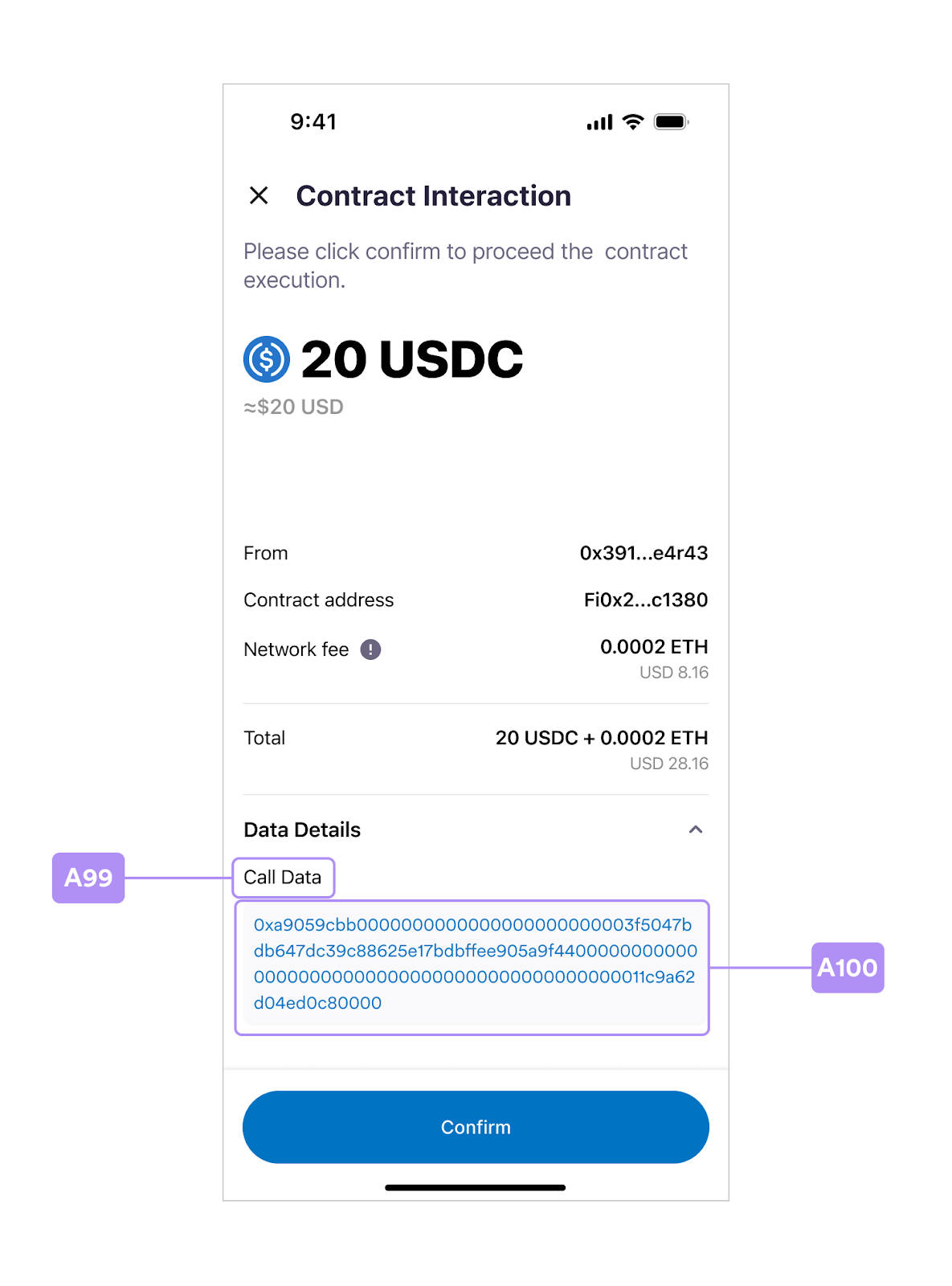
Contract Interaction
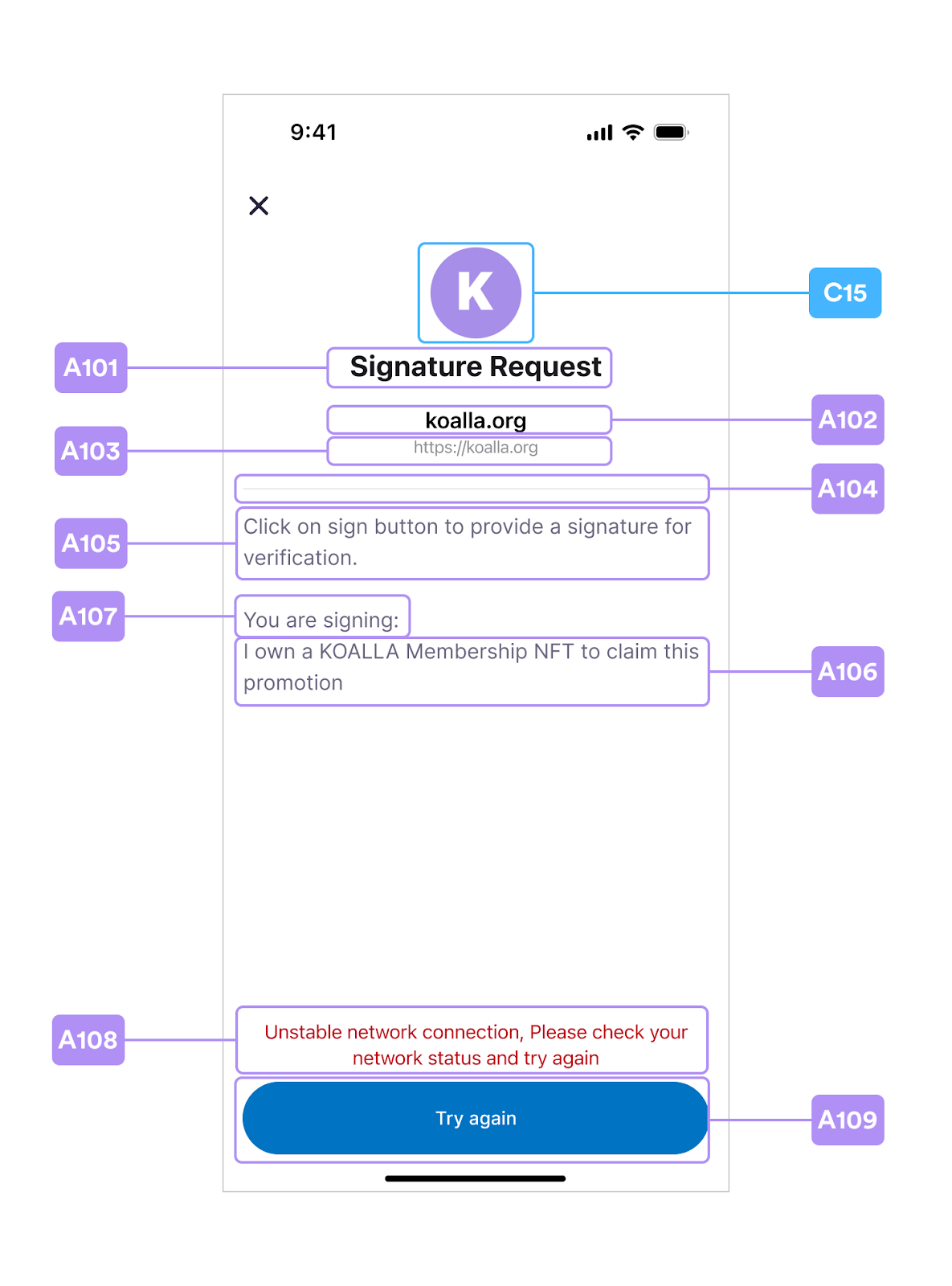
Signature Request
Verify Email OTP
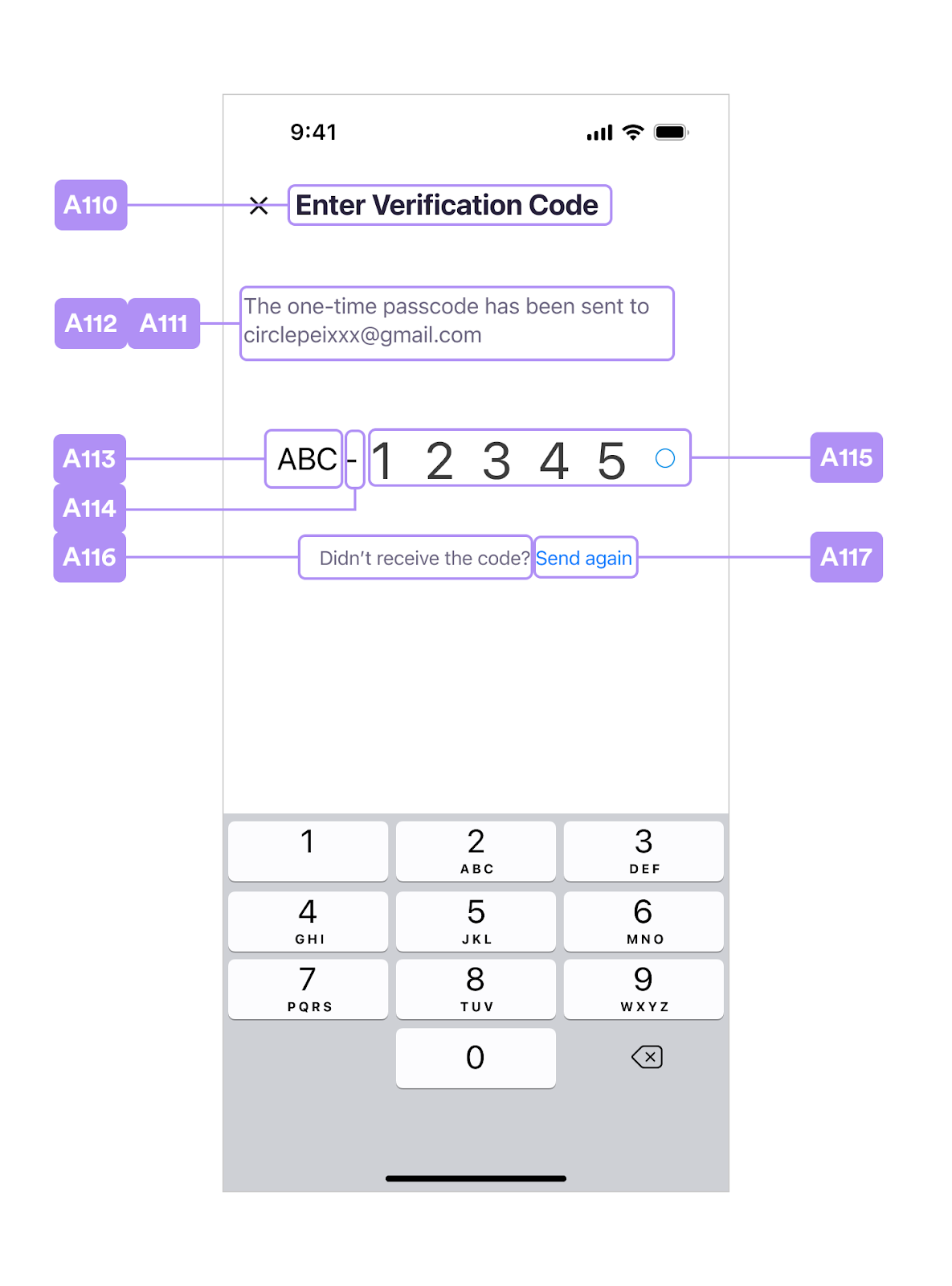
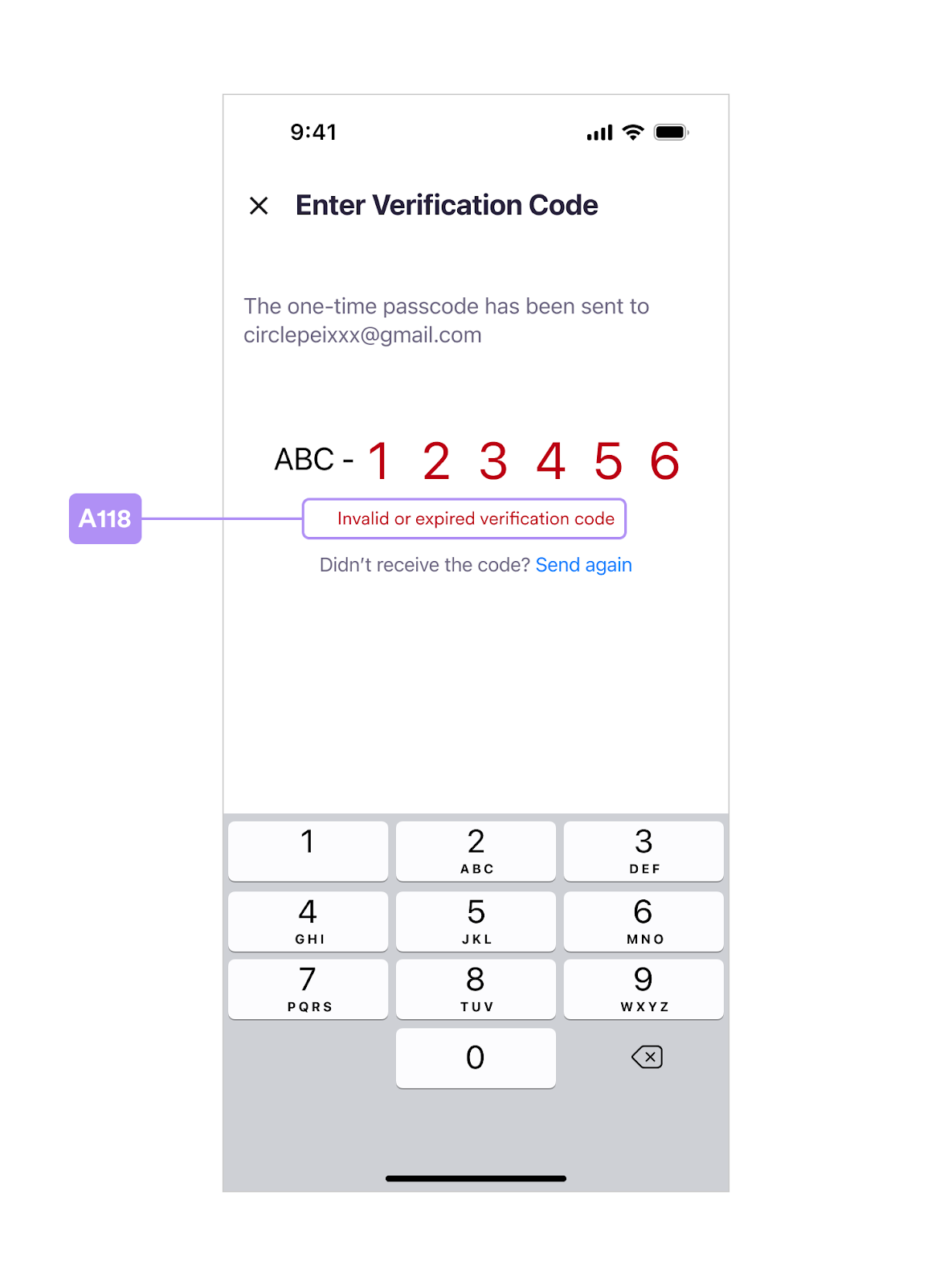
Index Table A
Based on the layouts, table A provides the UI item named in the controller and the keys in use. You can get the UIViewController fromWalletSdkDelegate and
customize the UI items in the run time. Also, you can provide the values in
static resources CirclePWLocalizable.strings and CirclePWTheme.json for
customization layouts in build time.
| Programmatic Customization | Static Resources | |||||
|---|---|---|---|---|---|---|
| CirclePWLocalizable.strings | CirclePWTheme.json | |||||
| # | Controller | Item | Note | font | color | |
| A1 | NewPINCodeViewController | titleLabel1 | - | circlepw_new_pincode_headline | semibold | text_main |
| A2 | ” | titleLabel2 | - | circlepw_new_pincode_headline_2 | bold | title_gradients |
| A3 | ” | subtitleLabel | - | circlepw_new_pincode_subhead | regular | text_auxiliary |
| A4 | BasePINInputViewController | - | dots and texts will be generated dynamically | - | light | pin_dot_base / pin_dot_base_border / pin_dot_activated / pin_dot_focused / pin_digit_activated / success / error |
| A5 | ” | - | shows ApiError.displayString | - | regular | error |
| A8 | ConfirmPINCodeViewController | titleLabel1 | - | circlepw_confirm_pincode_headline | semibold | text_main |
| A9 | ” | titleLabel2 | - | circlepw_confirm_pincode_headline_2 | bold | title_gradients |
| A10 | ” | subtitleLabel | - | circlepw_confirm_pincode_subhead | regular | text_auxiliary |
| A11 | EnterPINCodeViewController | titleLabel1 | - | circlepw_enter_pincode_headline | semibold | text_main |
| A12 | ” | titleLabel2 | - | circlepw_enter_pincode_headline_2 | bold | title_gradients |
| A13 | ” | subtitleLabel | - | circlepw_enter_pincode_subhead | regular | text_auxiliary |
| A14 | ” | forgotPINButton | - | circlepw_enter_pincode_forgot_pin | semibold | text_action / text_action_pressed |
| A65 | ” | biometricsButton | - | circlepw_enter_pincode_use_biometrics | semibold | text_action / text_action_pressed |
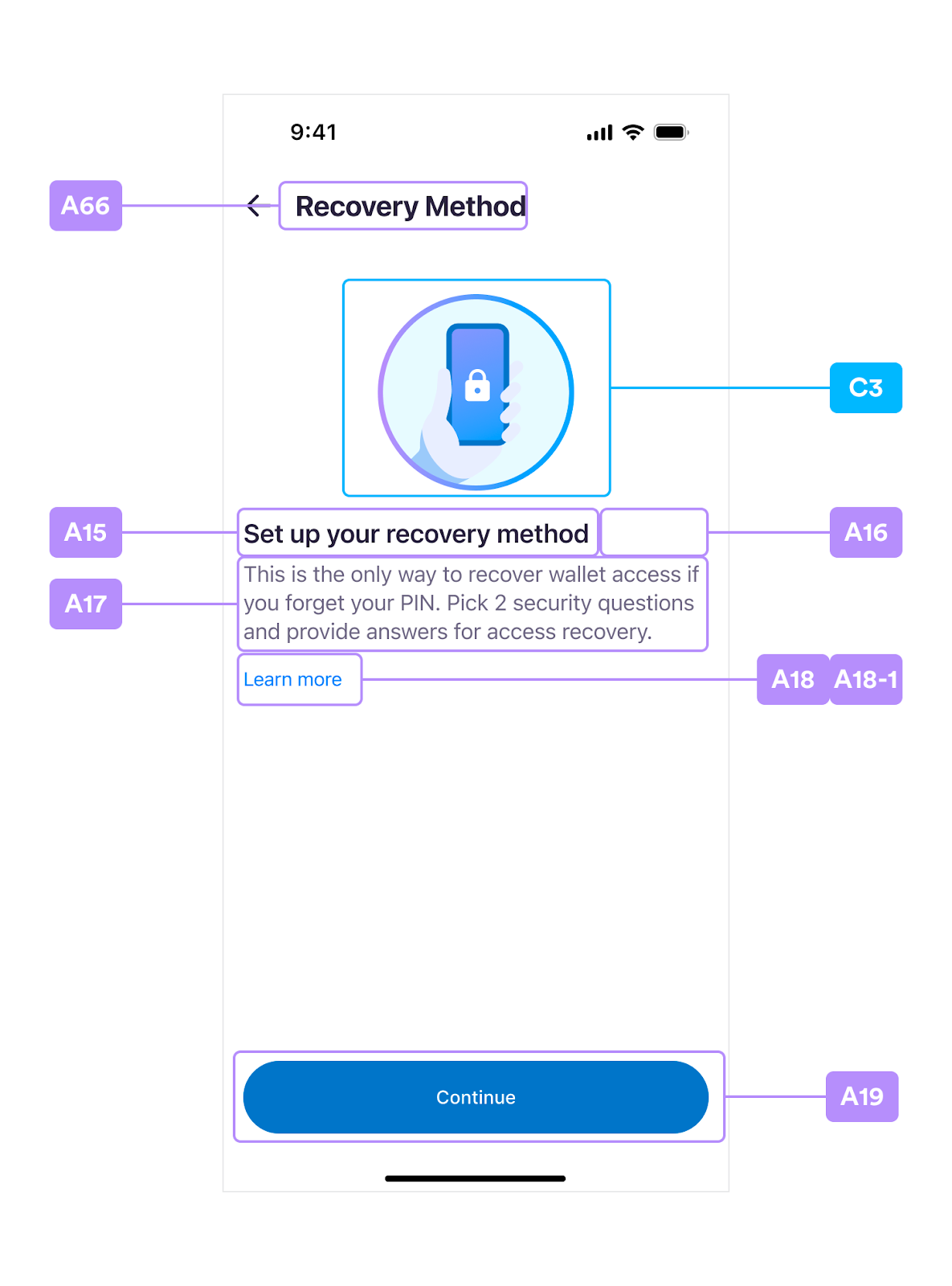
| A15 | SecurityIntrosViewController | titleLabel1 | - | circlepw_security_intros_headline | semibold | text_main |
| A16 | ” | titleLabel2 | - | circlepw_security_intros_headline_2 | bold | title_gradients |
| A17 | ” | introDescLabel | - | circlepw_security_intros_description | regular | text_auxiliary2 |
| A18 | ” | introLinkButton | - | circlepw_security_intros_link | regular | text_action / text_action_pressed |
| A18-1 | ” | introLink | custom your url string | - | - | - |
| A19 | ” | continueButton | text | circlepw_continue | semibold | main_bt_text / main_bt_text_pressed / main_bt_text_disabled |
| ” | ” | background | - | - | main_bt_background / main_bt_background_pressed / main_bt_background_disabled | |
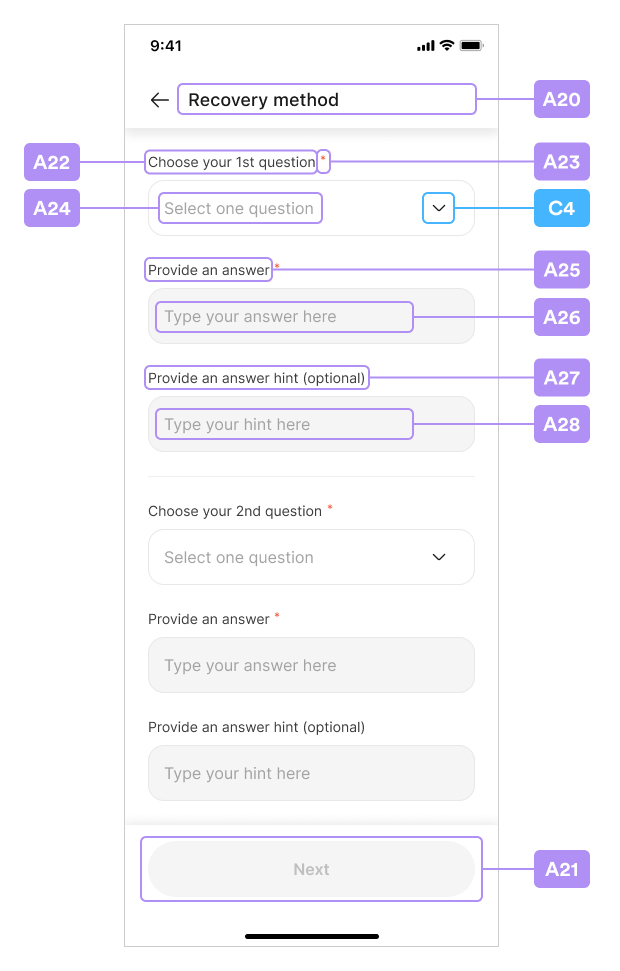
| A20 | SecurityQuestionsViewController | baseNaviTitleLabel | - | circlepw_security_questions_title | medium | text_main |
| A21 | ” | nextButton | text | circlepw_next | semibold | main_bt_text / main_bt_text_pressed / main_bt_text_disabled |
| ” | background | - | - | main_bt_background / main_bt_background_pressed / main_bt_background_disabled | ||
| A22 | SecurityQuestionTableViewCell | questionTitleLabel | - | circlepw_security_questions_question_header | regular | text_auxiliary |
| A23 | ” | questionMarkLabel | - | circlepw_security_questions_required_mark | regular | error |
| A24 | ” | - | placeholder | circlepw_security_questions_question_placeholder | regular | text_placeholder |
| ” | - | selected question | - | regular | text_main | |
| A25 | ” | answerTitleLabel | - | circlepw_security_questions_answer_header | regular | text_auxiliary |
| A26 | ” | - | placeholder | circlepw_security_questions_answer_placeholder | regular | text_placeholder |
| ” | - | input text | - | regular | text_main | |
| ” | - | view | - | - | input_background_disabled / input_border / input_border_focused | |
| A27 | ” | hintTitleLabel | - | circlepw_security_questions_answer_hint_header | regular | text_auxiliary |
| A28 | ” | - | placeholder | circlepw_security_questions_answer_hint_placeholder | regular | text_placeholder |
| ” | - | input text | - | regular | text_main | |
| ” | - | view | - | - | input_background_disabled / input_border / input_border_focused | |
| A29 | ” | hintWarningLabel | ApiError(.hintsMatchAnswers) | - | regular | error |
| A30 | SelectQuestionViewController | baseNaviTitleLabel | - | circlepw_select_question_title | medium | text_main |
| A31 | SelectQuestionTableViewCell | titleLabel | question list | - | regular | text_main |
| A32 | SecuritySummaryViewController | baseNaviTitleLabel | - | circlepw_security_summary_title | medium | text_main |
| A33 | ” | continueButton | text | circlepw_continue | semibold | main_bt_text / main_bt_text_pressed / main_bt_text_disabled |
| ” | background | - | - | main_bt_background / main_bt_background_pressed / main_bt_background_disabled | ||
| A34 | SecuritySummaryTableViewCell | titleLabel | - | {ordinal} + circlepw_question | semibold | text_main2 |
| A35 | ” | questionTitleLabel | - | circlepw_question + “:” | regular | text_auxiliary2 |
| A36 | ” | - | - | - | regular | text_summary |
| A37 | ” | answerTitleLabel | - | circlepw_answer + “:“ | regular | text_auxiliary2 |
| A38 | ” | - | - | - | semibold | text_summary_highlight |
| A39 | ” | hintTitleLabel | - | circlepw_hint + “:“ | regular | text_auxiliary2 |
| A40 | ” | - | - | circlepw_empty_placeholder | regular | text_summary |
| A41 | SecurityConfirmViewController | baseNaviTitleLabel | - | circlepw_security_confirm_title | medium | text_main |
| A42 | ” | imageBgView | - | - | - | security_confirm_main_bg |
| A43 | ” | tipsTitleLabel | - | circlepw_security_confirm_headline | medium | text_main |
| A44 | ” | agreeTitleLabel | - | circlepw_security_confirm_input_headline | semibold | text_main2 |
| A45 | ” | agreeTextField | placeholder | circlepw_security_confirm_input_placeholder | regular | text_placeholder |
| ” | ” | input text | - | regular | text_main2 | |
| ” | ” | view | - | - | input_background_disabled / input_border / input_border_focused | |
| A46 | ” | continueButton | text | circlepw_continue | semibold | main_bt_text / main_bt_text_pressed / main_bt_text_disabled |
| ” | ” | background | - | - | main_bt_background / main_bt_background_pressed / main_bt_background_disabled | |
| A47 | RecoverPINCodeViewController | titleLabel1 | - | circlepw_recover_pincode_headline | semibold | text_main |
| A48 | ” | titleLabel2 | - | circlepw_recover_pincode_headline_2 | bold | title_gradients |
| A49 | ” | - | shows ApiError.displayString | - | regular | text_main |
| A50 | ” | errorMessageView | background | - | - | error_background |
| A51 | ” | confirmButton | text | circlepw_confirm | semibold | main_bt_text / main_bt_text_pressed / main_bt_text_disabled |
| ” | ” | background | - | - | main_bt_background / main_bt_background_pressed / main_bt_background_disabled | |
| A52 | RecoverPINCodeTableViewCell | - | - | - | regular | text_main2 |
| A53 | ” | hintTitleLabel | text | circlepw_hint | regular | recover_pin_hint_title |
| ” | ” | background | - | - | recover_pin_hint_title_bg | |
| A54 | ” | - | placeholder | circlepw_empty_placeholder | regular | recover_pin_hint |
| A55 | ” | answerTitleLabel | - | circlepw_recover_pincode_answer_input_header | regular | text_auxiliary |
| A56 | ” | answerMarkLabel | - | circlepw_security_questions_required_mark | regular | error |
| A57 | ” | - | placeholder | circlepw_recover_pincode_answer_input_placeholder | regular | text_placeholder |
| ” | - | input text | - | regular | text_main | |
| ” | - | view | - | - | input_background_disabled / input_border / input_border_focused | |
| A58 | BiometricsPromptViewController | promptTitleLabel | Set up biometrics first in the process | circlepw_pin_biometrics_allow_title | bold | text_prompt |
| A60 | ” | ” | After first setting up biometrics process | circlepw_pin_biometrics_failed_title | ||
| A62 | ” | ” | Update after failure to use biometric PIN | circlepw_pin_biometrics_update_title | ||
| A59 | ” | promptSubtitleLabel | Set up biometrics in the process | circlepw_pin_biometrics_allow_subtitle | regular | text_prompt2 |
| A61 | ” | ” | Update after failure to use biometric PIN | circlepw_pin_biometrics_update_subtitle | ||
| A63 | ” | skipButton | text | circlepw_skip | semibold | second_bt_text |
| ” | ” | background | - | - | second_bt_border / second_bt_background / second_bt_background_pressed | |
| A64 | ” | dontAskButton | text | circlepw_pin_biometrics_disable | semibold | plain_bt_text |
| ” | ” | background | - | - | plain_bt_background / plain_bt_background_pressed | |
| A67 | - | - | - | circlepw_pin_touch_id_dialog_subtitle | - | - |
| A68 | BaseRequestViewController | baseNaviTitleLabel | - | circlepw_transaction_request_title | medium | text_main |
| A69 | ” | descriptionLabel | - | circlepw_transaction_request_subtitle | regular | text_auxiliary |
| A70 | ” | confirmButton | text | circlepw_confirm / circlepw_try_again | semibold | main_bt_text / main_bt_text_pressed / main_bt_text_disabled |
| ” | ” | background | - | - | main_bt_background / main_bt_background_pressed / main_bt_background_disabled | |
| A71 | ” | errorLabel | shows ApiError.displayString | - | regular | error |
| A72 | TransactionRequestViewController | amountLabel | - | - | heavy | text_prompt |
| A73 | ” | currencyLabel | - | circlepw_transaction_request_main_currency | heavy | text_prompt |
| A74 | ” | txFiatValueLabel | If it has no value, it will be hidden | circlepw_transaction_request_exchange_amount | semibold | text_exchange |
| A75 | ” | fromTitleLabel | If the fromLabel has no value, it will be hidden | circlepw_transaction_request_from_label | regular | text_prompt |
| A76 | ” | fromLabel | - | circlepw_transaction_request_from | semibold | text_prompt |
| A77 | ” | toTitleLabel | - | circlepw_transaction_request_to_label | regular | text_prompt |
| A78 | ” | toContractNameLabel | If it has no value, it will be hidden | circlepw_transaction_request_to_contract_name | semibold | text_prompt |
| A79 | ” | toContractURLLabel | If it has no value, it will be hidden | circlepw_transaction_request_to_contract_url | semibold | text_prompt |
| A80 | ” | toLabel | - | - | semibold | text_prompt |
| A81 | ” | feeTitleLabel | If the feeLabel has no value, it will be hidden | circlepw_transaction_request_network_fee_label | regular | text_prompt |
| A82 | ” | feeLabel | - | circlepw_transaction_request_network_fee | semibold | text_prompt |
| A83 | ” | feeFiatValueLabel | - | circlepw_transaction_request_exchange_network_fee | regular | text_exchange |
| A84 | ” | totalTitleLabel | If the totalLabel has no value, it will be hidden | circlepw_transaction_request_total_label | regular | text_prompt |
| A85 | ” | totalLabel | - | - | semibold | text_prompt |
| A86 | ” | totalFiatValueLabel | If it or the totalLabel has no value, it will be hidden | circlepw_transaction_request_exchange_total_value | regular | text_exchange |
| A87 | ” | dividerView1 | - | - | - | divider |
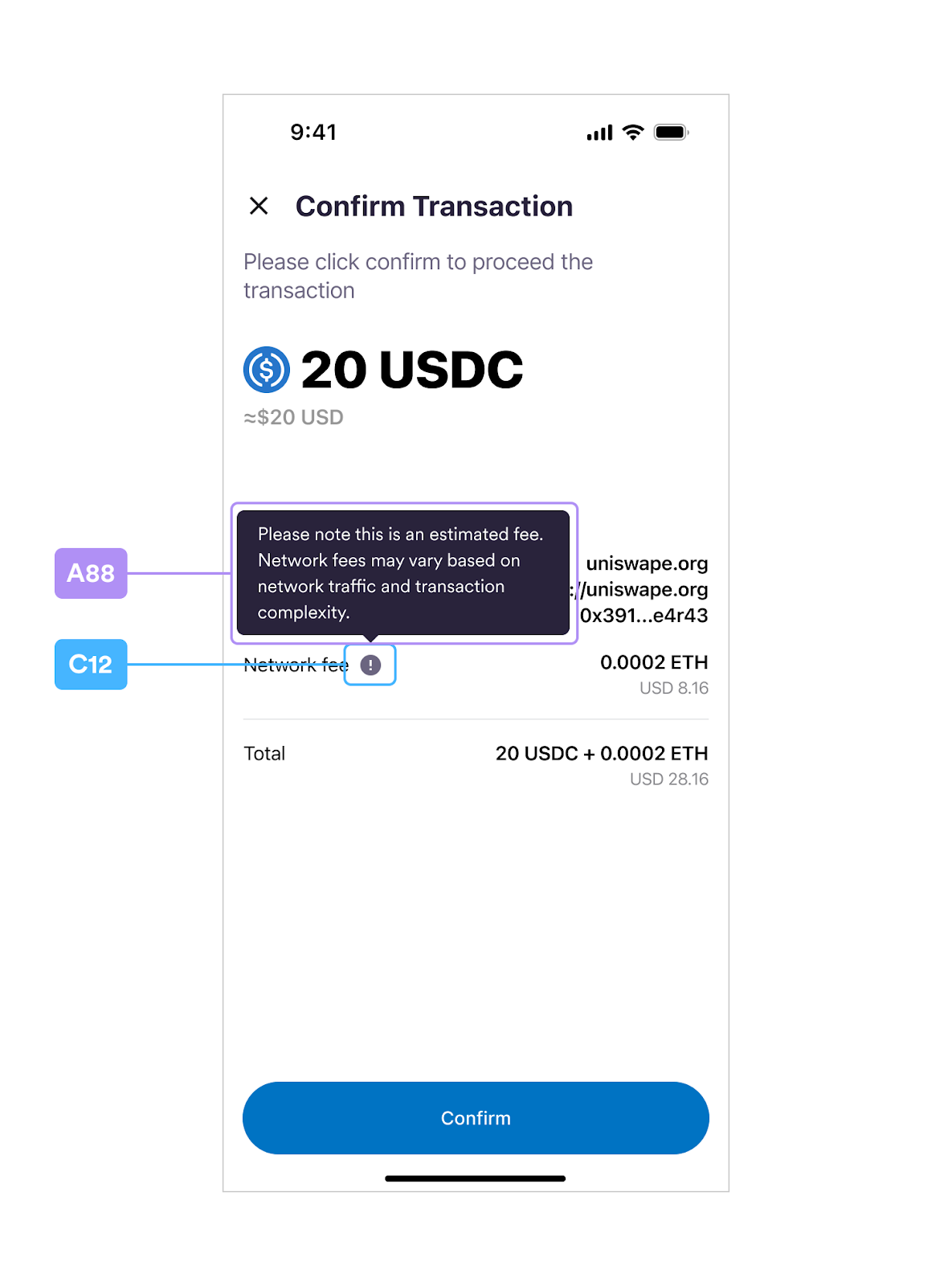
| A88 | FeeTipViewController | descriptionLabel | - | circlepw_transaction_request_fee_tip | regular | tip_text |
| ” | backgroundColor | - | - | - | tip_background | |
| A89 | ContractRequestViewController | baseNaviTitleLabel | - | circlepw_contract_interaction_title | medium | text_main |
| A90 | ” | descriptionLabel | - | circlepw_contract_interaction_subtitle | regular | text_auxiliary |
| A91 | ” | contractAddressTitleLabel | - | circlepw_contract_interaction_contract_address_label | regular | text_prompt |
| A92 | ” | contractAddressLabel | - | - | semibold | text_prompt |
| A93 | ” | dividerView2 | - | - | - | divider |
| A94 | ” | dataDetailsLabel | - | circlepw_contract_interaction_data_details | semibold | text_prompt |
| A95 | ” | abiFunctionTitleLabel | - | circlepw_contract_interaction_abi_function_label | regular | text_prompt |
| A96 | ” | abiFunctionLabel | - | - | semibold | text_prompt |
| A97 | ” | abiParameterTitleLabel | - | circlepw_contract_interaction_abi_parameter_label | regular | text_prompt |
| A98 | ” | abiParameterLabel | text | - | regular | text_interactive |
| ” | ” | background | - | - | interactive_background | |
| A99 | ” | callDataTitleLabel | - | circlepw_contract_interaction_call_data_label | regular | text_prompt |
| A100 | ” | callDataLabel | text | - | regular | text_interactive |
| ” | ” | background | - | - | interactive_background | |
| A101 | SignatureRequestViewController | titleLabel | - | circlepw_signature_request_title | semibold | text_main |
| A102 | ” | contractNameLabel | If it has no value, it will be hidden | circlepw_signature_request_contract_name | semibold | text_prompt |
| A103 | ” | contractURLLabel | If it has no value, it will be hidden | circlepw_signature_request_contract_name | regular | text_sign_url |
| A104 | ” | dividerView | - | - | - | divider |
| A105 | ” | subtitleLabel | - | circlepw_signature_request_subtitle | regular | text_auxiliary |
| A106 | ” | descriptionLabel | - | circlepw_signature_request_description | regular | text_auxiliary |
| A107 | ” | messageLabel | - | - | regular | text_auxiliary |
| A108 | ” | errorLabel | shows ApiError.displayString | - | regular | error |
| A109 | ” | confirmButton | text | circlepw_confirm / circlepw_try_again | semibold | main_bt_text / main_bt_text_pressed / main_bt_text_disabled |
| ” | ” | background | - | - | main_bt_background / main_bt_background_pressed / main_bt_background_disabled | |
| A110 | EmailOTPViewController | baseNaviTitleLabel | - | circlepw_email_otp_title | medium | text_main |
| A111 | ” | descriptionLabel | - | circlepw_email_otp_description | regular | text_auxiliary |
| A112 | ” | - | circlepw_email_otp_email | |||
| A113 | ” | otpHeadLabel | - | - | regular | text_prompt |
| A114 | ” | otpDashLabel | - | circlepw_email_otp_dash | regular | text_prompt |
| A115 | ” | - | texts will be generated dynamically | - | light | pin_dot_base / pin_dot_base_border / pin_dot_focused / pin_digit_activated / success / error |
| A116 | ” | sendAgainHintLabel | - | circlepw_email_otp_send_again_hint | regular | text_auxiliary |
| A117 | ” | sendAgainButton | - | circlepw_email_otp_send_again | regular | text_action / text_action_pressed |
| A118 | ” | errorMessageLabel | shows ApiError.displayString | - | regular | error |
Index Table B
By confirming theWalletSdkLayoutProvider, you can custom layout from Table-B
dynamically. See the
Sample Code.
| # | WalletSdkLayoutProvider | Note |
|---|---|---|
| B1 | func securityQuestions() -> [SecurityQuestion] | Set security question list |
| B2 | func securityQuestionsRequiredCount() -> Int | Set security question required count (default is 2) |
| B3 | func securityConfirmItems() -> [SecurityConfirmItem] | Set security confirm item list |
| B4 | func displayDateFormat() -> String | Set the date format for display date strings. (Default is “yyyy-MM-dd”) |
| - | func imageStore() -> ImageStore | Set local and remote images (more details in Table-C) |
| - | func themeFont() -> ThemeConfig.ThemeFont? | Set theme font programmatically- Provide the ThemeFont structure by code. - This method will override the font setups in CirclePWTheme.json file. - |
Index Table C
| Used in WalletSdkLayoutProvider | Used in WalletSdkDelegate | ||
|---|---|---|---|
| # | ImageStore.Img (Enum) | Controller | Item |
| C1 | naviClose | - | - |
| C2 | naviBack | - | - |
| C3 | securityIntroMain | SecurityIntrosViewController | introImageView |
| C4 | dropdownArrow | SecurityQuestionTableViewCell | questionTrailingButton |
| C5 | selectCheckMark | SelectQuestionTableViewCell | checkmarkImage |
| C6 | securityConfirmMain | SecurityConfirmViewController | imageView |
| C7 | errorInfo | RecoverPINCodeViewController | errorImageView |
| C8 | showPin | BasePINInputViewController (NewPIN/ConfirmPIN/EnterPIN) | showPINButton (normal state) |
| C9 | hidePin | BasePINInputViewController (NewPIN/ConfirmPIN/EnterPIN) | showPINButton (selected state) |
| C10 | biometricsAllowMain | BiometricsPromptViewController | imageView |
| C11 | transactionTokenIcon | TransactionRequestViewController | tokenSymbol |
| C12 | networkFeeTipIcon | TransactionRequestViewController | feeTipIcon |
| C13 | showLessDetailArrow | ContractRequestViewController | showLessMoreDetailButton |
| C14 | showMoreDetailArrow | ContractRequestViewController | showLessMoreDetailButton |
| C15 | requestIcon | SignatureRequestViewController | requestIcon |
- Use the
ImageStore.Img (Enum)column to customize with theWalletSdkLayoutProvider:
Swift
func imageStore() -> ImageStore {
    let local: [ImageStore.Img: UIImage] = [
        .naviBack: UIImage(named: "ic_navi_back")!,
        .naviClose: UIImage(named: "ic_navi_close")!,
        .selectCheckMark: UIImage(named: "ic_checkmark")!,
        .dropdownArrow: UIImage(named: "ic_trailing_down")!,
        .errorInfo: UIImage(named: "ic_warning_alt")!,
        .securityIntroMain: UIImage(named: "img_security_intro")!,
        .securityConfirmMain: UIImage(named: "img_driver_blog")!,
        .biometricsAllowMain: UIImage(named: "ic_biometrics")!,
        .hidePin: UIImage(named: "eye_closed")!,
        .showPin: UIImage(named: "eye_open")!,
        .transactionTokenIcon: UIImage(named: "BTC")!,
        .networkFeeTipIcon: UIImage(named: "BTC")!,
        .showLessDetailArrow: UIImage(named: "chevron-up")!,
        .showMoreDetailArrow: UIImage(named: "chevron-down")!,
        .requestIcon: UIImage(named: "dApp_icon")!,
    ]

    let remote: [ImageStore.Img: URL] = [
        .securityIntroMain: URL(string: "https://www.circle.com/hs-fs/hubfs/Sundaes/810/global-payments-810x810.png")!,
        .securityConfirmMain: URL(string: "https://www.circle.com/hs-fs/hubfs/Sundaes/810/Trust-810x810.png")!,
    ]

    return ImageStore(local: local, remote: remote)
}
- If you set both local and remote images, the remote image will present after the image loads, and the local image will be set as the placeholder image.
- The remote image formats supported include those from the Apple system (JPEG, PNG, TIFF, BMP, etc.), GIF, and APNG animated images.
- The remote image formats unsupported for new image formats include HEIC, BPG, AVIF, and vector formats such as PDF and SVG.
- The Controller and Item column shows where the images are used.
Refer to the UI items If you have special customizations withWalletSdkDelegate(not recommended)
Static Resources
This section describes how to customize the UI for iOS statically.Note:Circle recommends customizing the UI using static files.You can copy the icon images from the
Sample Project.
Assets
Because theCircleProgrammableWalletSDK does not contain any image resources
for the SDK; you must provide the icon images from either local assets or remote
URLs.
Important:Setting the
WalletSdkLayoutProvider.imageStore in WalletSdkLayoutProvider is
required for you to see icons in the layouts.CirclePWLocalizable.strings
Setup
- Create a file CirclePWLocalizable.strings in your main bundle.
- Provide your strings. Partial override is supported.
Note:You can provide specific keys and values you want to override and others keys
will still refer to the default values.
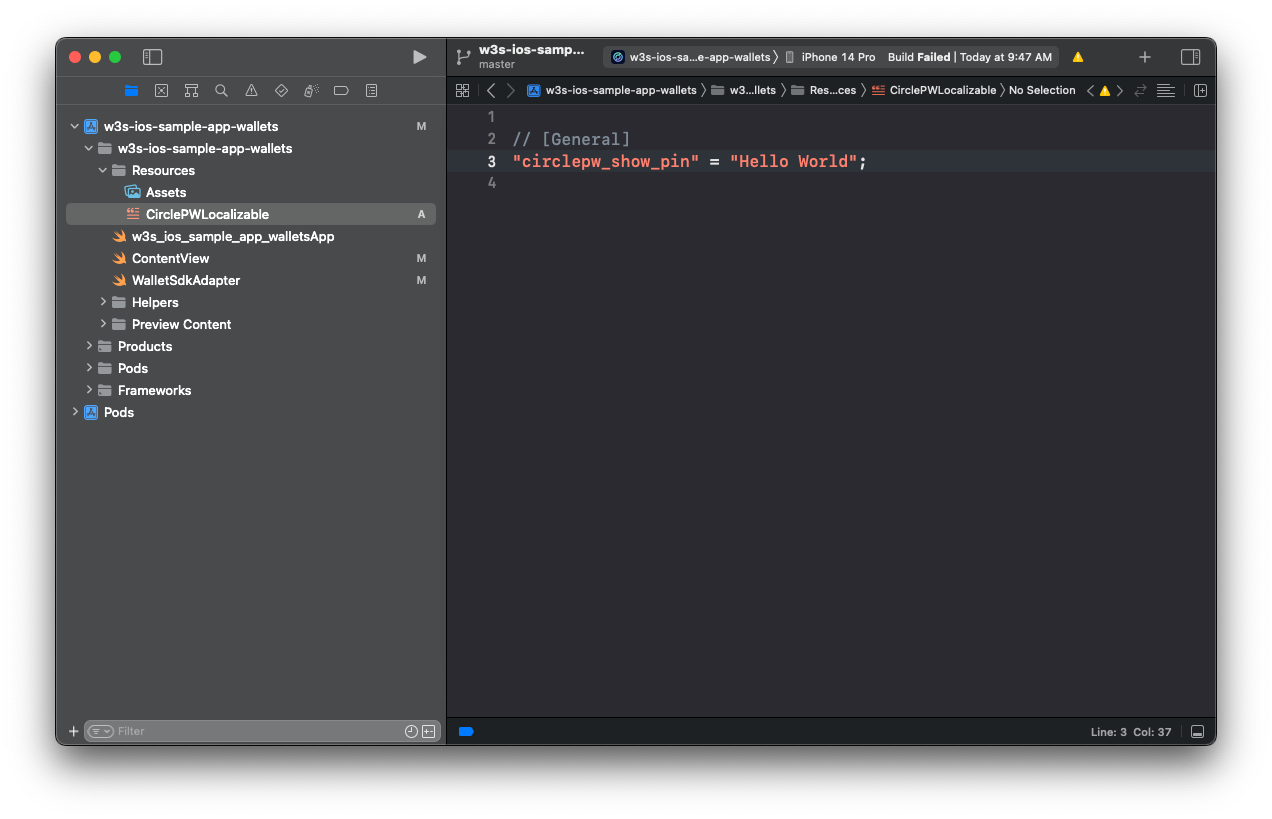
- Localization is supported. For more information, see Localization | Apple Developer Documentation.
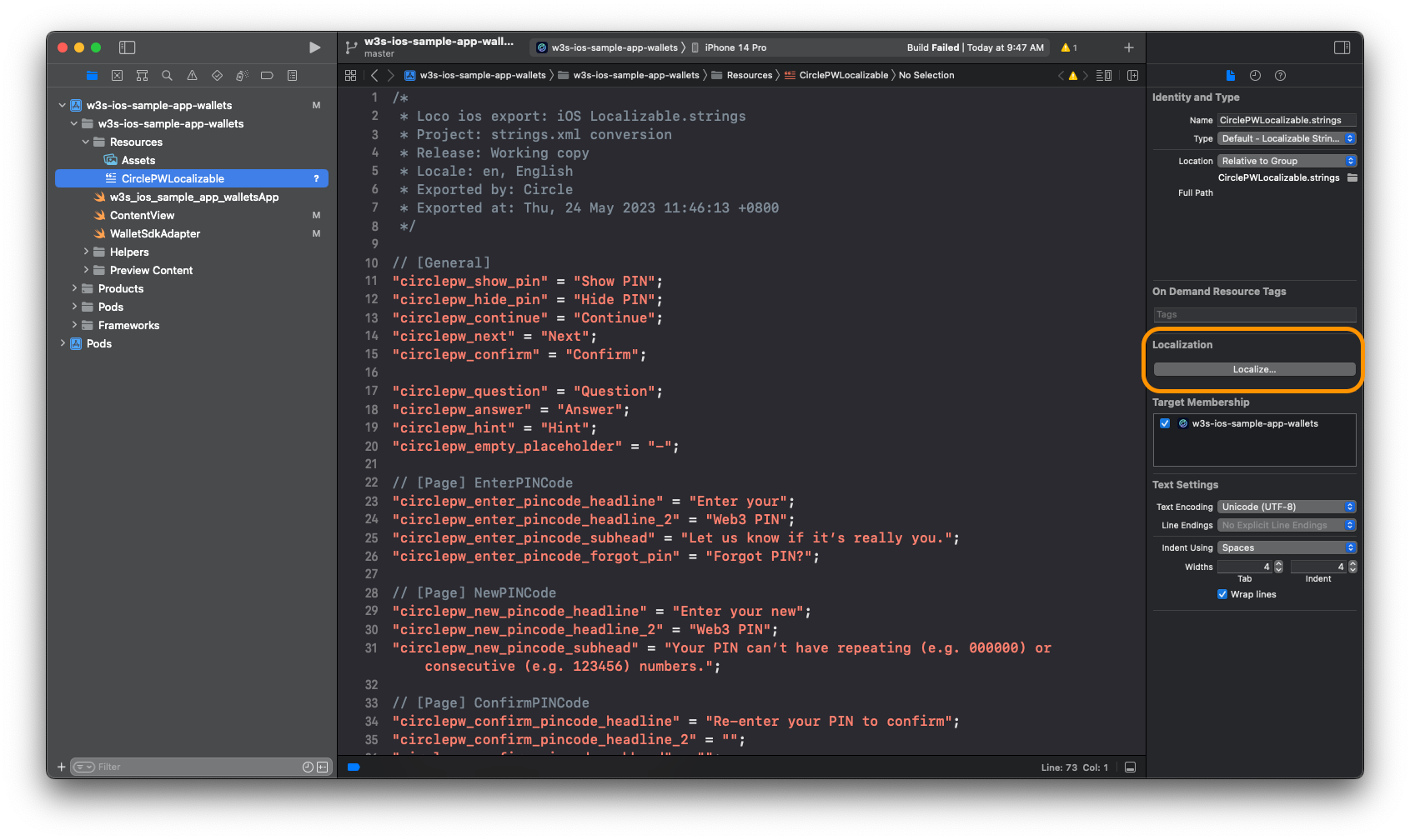
Example CirclePWLocalizable.strings
Swift
/*
 * Loco ios export: iOS Localizable.strings
 * Project: strings.xml conversion
 * Release: Working copy
 * Locale: en, English
 * Exported by: Circle
 * Exported at: Tue, 27 Jun 2023 23:35:22 +0800
 */

// [General]
"circlepw_continue" = "Continue";
"circlepw_next" = "Next";
"circlepw_confirm" = "Confirm";
"circlepw_skip" = "Skip";
"circlepw_sign" = "Sign";
"circlepw_try_again" = "Try Again";

"circlepw_question" = "Question";
"circlepw_answer" = "Answer";
"circlepw_hint" = "Hint";
"circlepw_empty_placeholder" = "-";

// [Page] EnterPINCode
"circlepw_enter_pincode_headline" = "Enter your";
"circlepw_enter_pincode_headline_2" = "Web3 PIN";
"circlepw_enter_pincode_subhead" = "Let us know if it's really you.";
"circlepw_enter_pincode_forgot_pin" = "Forgot PIN?";

// [Page] NewPINCode
"circlepw_new_pincode_headline" = "Enter your new";
"circlepw_new_pincode_headline_2" = "Web3 PIN";
"circlepw_new_pincode_subhead" = "Your PIN can't have repeating (e.g. 000000) or consecutive (e.g. 123456) numbers.";

// [Page] ConfirmPINCode
"circlepw_confirm_pincode_headline" = "Re-enter your PIN to confirm";
"circlepw_confirm_pincode_headline_2" = "";
"circlepw_confirm_pincode_subhead" = "";

// [Page] SecurityIntros
"circlepw_security_intros_headline" = "Set up your";
"circlepw_security_intros_headline_2" = "Recovery Method";
"circlepw_security_intros_description" = "This is the only way to recover wallet access if you forget your PIN. Pick 2 security questions and provide answers for access recovery.";
"circlepw_security_intros_link" = "Learn more";

// [Page] SecurityQuestions
"circlepw_security_questions_title" = "Recovery method";
"circlepw_security_questions_question_header" = "Choose your %@ question";
"circlepw_security_questions_question_placeholder" = "Select one question";
"circlepw_security_questions_required_mark" = "*";
"circlepw_security_questions_answer_header" = "Provide an answer";
"circlepw_security_questions_answer_placeholder" = "Type your answer here";
"circlepw_security_questions_answer_hint_header" = "Provide an answer hint (optional)";
"circlepw_security_questions_answer_hint_placeholder" = "Type your hint here";

// [Page] SelectQuestion
"circlepw_select_question_title" = "Select one question";

// [Page] SecuritySummary
"circlepw_security_summary_title" = "Summary";

// [Page] SecurityConfirm
"circlepw_security_confirm_title" = "Confirmation";
"circlepw_security_confirm_headline" = "Keep your questions safe";
"circlepw_security_confirm_input_headline" = "Type “I agree” to proceed:";
"circlepw_security_confirm_input_placeholder" = "Type “I agree” here";
"circlepw_security_confirm_input_match" = "I agree";

// [Page] RecoverPINCode
"circlepw_recover_pincode_headline" = "Recover your";
"circlepw_recover_pincode_headline_2" = "Web3 PIN";
"circlepw_recover_pincode_subhead" = "Please enter the answer of the security questions provided below.";
"circlepw_recover_pincode_answer_input_header" = "Enter your answer here";
"circlepw_recover_pincode_answer_input_placeholder" = "Type your answer here";

// [Page] BiometricsPrompt
"circlepw_pin_biometrics_allow_title" = "Allow Biometrics for Web3 Access";
"circlepw_pin_biometrics_allow_subtitle" = "Elevate Your Experience with Effortless Biometrics";
"circlepw_pin_biometrics_failed_title" = "Failed Biometrics for Web3 Access";
"circlepw_pin_biometrics_update_title" = "Update Biometrics for Web3 Access";
"circlepw_pin_biometrics_update_subtitle" = "Please update your biometrics";
"circlepw_pin_biometrics_disable" = "Don't ask me again";
"circlepw_pin_touch_id_dialog_subtitle" = "Using Touch ID protect PIN";

// [Page] EmailOTP
"circlepw_email_otp_title" = "Enter verification code";
"circlepw_email_otp_description" = "The one-time passcode has been sent to";
"circlepw_email_otp_email" = "your email";
"circlepw_email_otp_dash" = "-";
"circlepw_email_otp_send_again_hint" = "Didn't receive the code?";
"circlepw_email_otp_send_again" = "Send again";

// [Page] SignatureRequest
"circlepw_signature_request_title" = "Signature Request";
"circlepw_signature_request_subtitle" = "Click on sign button to provide a signature for verification";
"circlepw_signature_request_contract_name" = "";
"circlepw_signature_request_contract_url" = "";
"circlepw_signature_request_description" = "You are signing:";

// [Page] TransactionRequest
"circlepw_transaction_request_title" = "Confirm Transaction";
"circlepw_transaction_request_subtitle" = "Please click confirm to proceed the transaction";
"circlepw_transaction_request_main_currency" = "";
"circlepw_transaction_request_exchange_amount" = "";
"circlepw_transaction_request_from_label" = "From";
"circlepw_transaction_request_from" = "";
"circlepw_transaction_request_to_label" = "To";
"circlepw_transaction_request_to_contract_name" = "";
"circlepw_transaction_request_to_contract_url" = "";
"circlepw_transaction_request_network_fee_label" = "Est. Network Fee";
"circlepw_transaction_request_network_fee" = "";
"circlepw_transaction_request_exchange_network_fee" = "";
"circlepw_transaction_request_total_label" = "Total";
"circlepw_transaction_request_exchange_total_value" = "";

// [View] FeeTip
"circlepw_transaction_request_fee_tip" = "Please note this is an estimated fee. Network fees may vary based on network traffic and transaction complexity.";

// [Page] RawTransactionRequest
"circlepw_transaction_request_raw_tx_description" = "Transaction details:";

// [Page] ContractRequest
"circlepw_contract_interaction_title" = "Contract Interaction";
"circlepw_contract_interaction_subtitle" = "Please click confirm to proceed the  contract execution";
"circlepw_contract_interaction_contract_address_label" = "Contract address";
"circlepw_contract_interaction_data_details" = "Data Details";
"circlepw_contract_interaction_abi_function_label" = "ABI Function";
"circlepw_contract_interaction_abi_parameter_label" = "ABI Parameters";
"circlepw_contract_interaction_call_data_label" = "Call Data";
CirclePWTheme.json
Setup
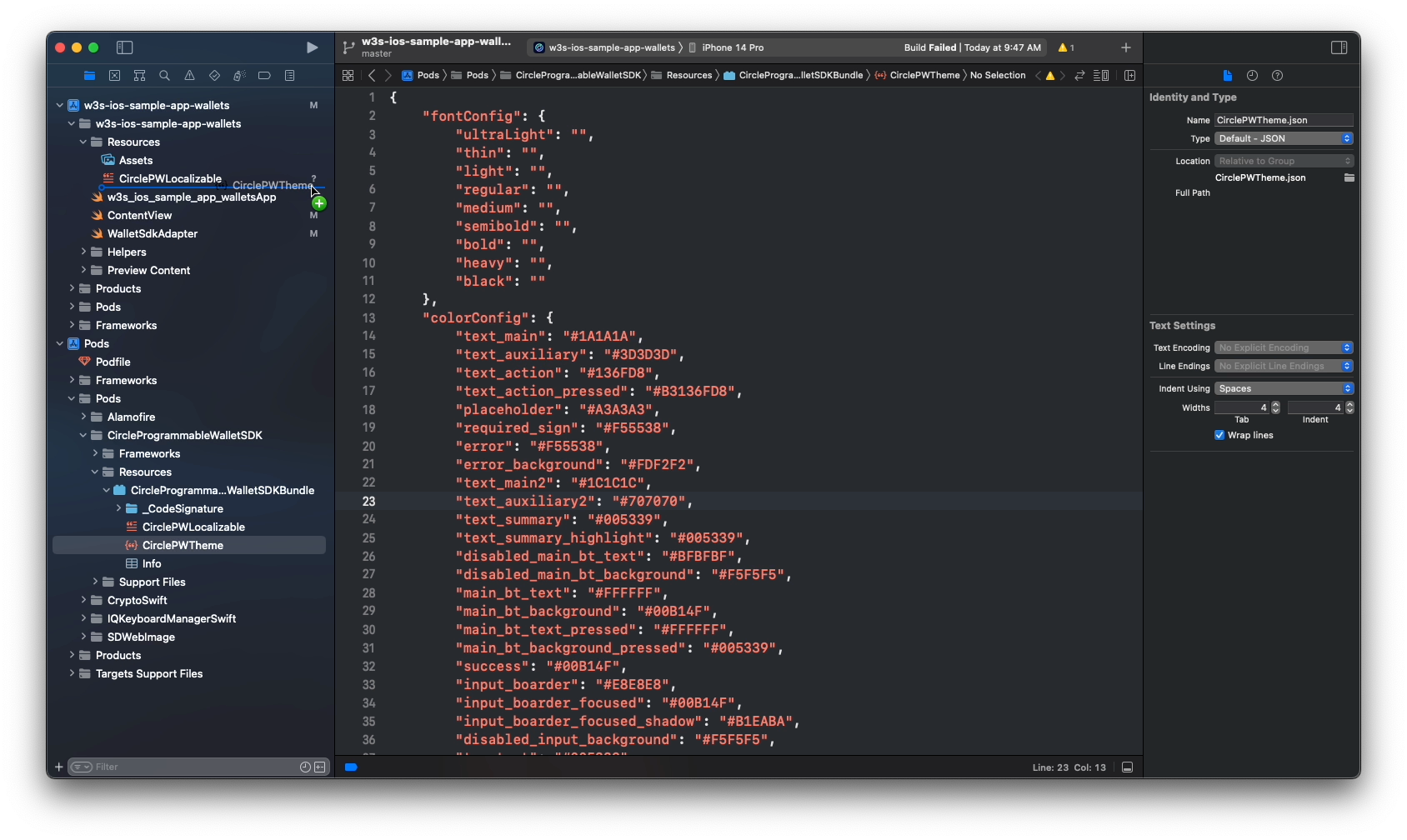
- Copy the file CirclePWTheme.json into your main bundle. You can use
Cmd + drag and drop.
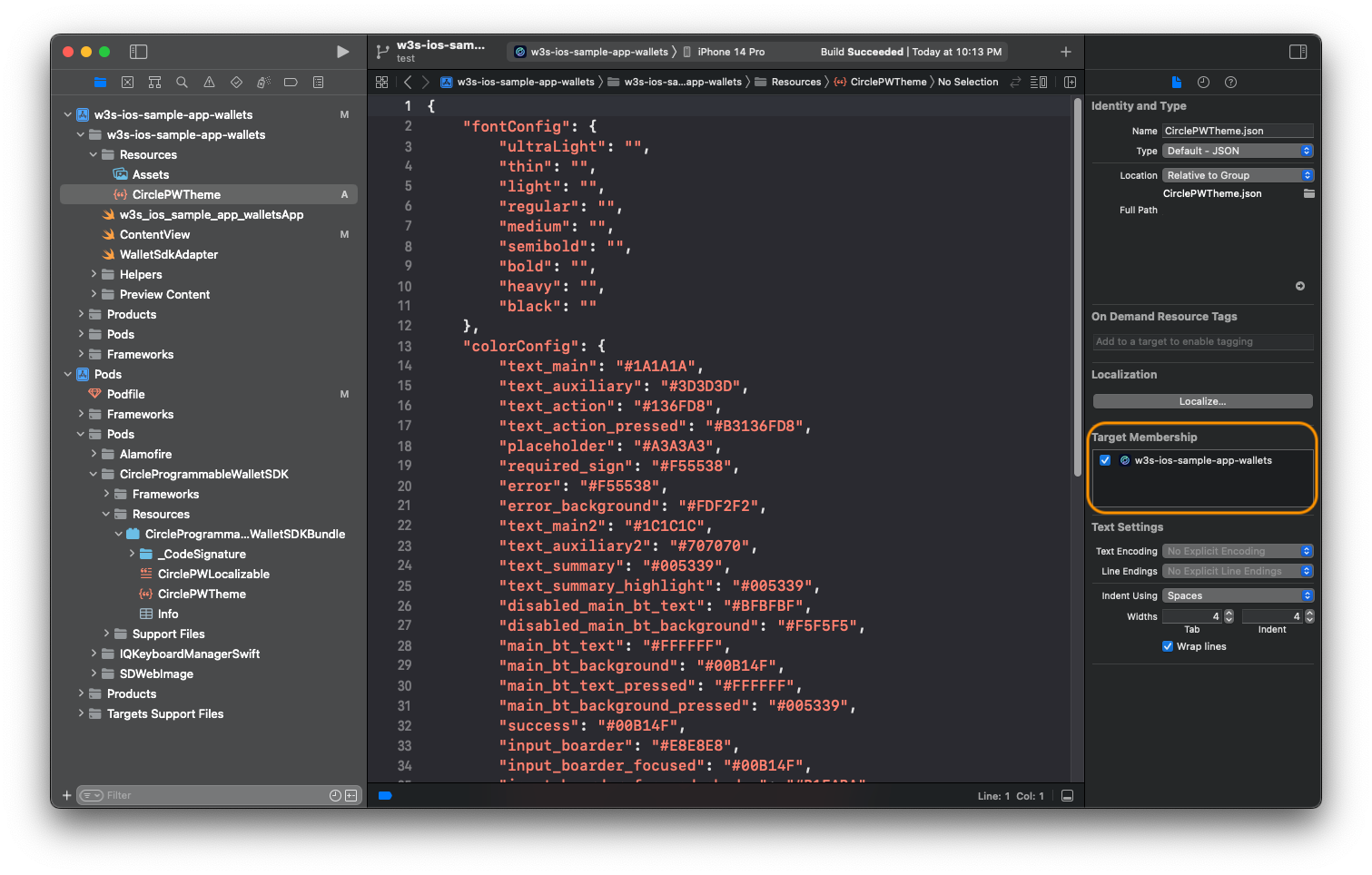
- Make sure you have selected the
Target Membership.
- Provide values to set the font: To use a custom font, refer to this document: Adding a Custom Font to Your App | Apple Developer Documentation.
- Set the color with a hex string:
Example: CirclePWTheme.json
JSON
{
  "font": {
    "ultraLight": "",
    "thin": "",
    "light": "",
    "regular": "CustomFont-Regular",
    "medium": "CustomFont-Medium",
    "semibold": "",
    "bold": "",
    "heavy": "",
    "black": ""
  },
  "color": {
    "background": "#FFFFFF",
    "divider": "#F0EFEF",
    "success": "#0B9C4A",
    "error": "#F55538",
    "error_background": "#FDF2F2",

    "text_main": "#1A1A1A",
    "text_main2": "#1C1C1C",
    "text_auxiliary": "#3D3D3D",
    "text_auxiliary2": "#707070",
    "text_summary": "#0073C3",
    "text_summary_highlight": "#0073C3",
    "text_placeholder": "#A3A3A3",
    "text_action": "#136FD8",
    "text_action_pressed": "#B3136FD8",
    "text_prompt": "#29233B",
    "text_prompt2": "#6B6580",
    "text_exchange": "#979797",
    "text_interactive": "#0073C3",
    "text_sign_url": "#8E8E93",

    "pin_dot_base": "#FFFFFF",
    "pin_dot_base_border": "#707070",
    "pin_dot_activated": "#3D3D3D",
    "pin_dot_focused": "#0073C3",
    "pin_digit_activated": "#3D3D3D",

    "input_border": "#E8E8E8",
    "input_border_focused": "#46B5FF",
    "input_background_disabled": "#F5F5F5",

    "main_bt_text": "#FFFFFF",
    "main_bt_text_pressed": "#80FFFFFF",
    "main_bt_text_disabled": "#BFBFBF",
    "main_bt_background": "#0073C3",
    "main_bt_background_pressed": "#1AA3FF",
    "main_bt_background_disabled": "#F5F5F5",

    "second_bt_text": "#0073C3",
    "second_bt_border": "#0073C3",
    "second_bt_background": "#FFFFFF",
    "second_bt_background_pressed": "#F1F9FE",

    "plain_bt_text": "#0073C3",
    "plain_bt_background": "#FFFFFF",
    "plain_bt_background_pressed": "#F1F9FE",

    "recover_pin_hint_title": "#3D3652",
    "recover_pin_hint_title_bg": "#E1F2FF",
    "recover_pin_hint": "#0073C3",

    "security_confirm_main_bg": "#E9EEFE",

    "tip_text": "#FFFFFF",
    "tip_background": "#29233B",

    "interactive_background": "#F9F9FC",

    "title_gradients": ["#0073C3", "#0073C3"]
  }
}
Programmatic Customization
To programmatically customize the UI refers to the following documents:- The corresponding rendered layout and the notes on Index Table B.
- The Programmable Wallet iOS SDK .
Example Code
Swift
extension WalletSdkAdapter: WalletSdkLayoutProvider {

    func securityQuestions() -> [SecurityQuestion] {
        return [
            SecurityQuestion(title: "What is your childhood nickname?", inputType: .text),
            SecurityQuestion(title: "What is the middle name of your oldest child?", inputType: .text),
            SecurityQuestion(title: "What is your favorite team?", inputType: .text),
            SecurityQuestion(title: "When was your birthday?", inputType: .datePicker),
            SecurityQuestion(title: "When is your marriage anniversary?", inputType: .datePicker),
        ]
    }

    func securityQuestionsRequiredCount() -> Int {
        return 2
    }

    func securityConfirmItems() -> [SecurityConfirmItem] {
        return [
            SecurityConfirmItem(image: UIImage(named: "img_info"),
                                text: "This is the only way to recover my account access."),
            SecurityConfirmItem(image: UIImage(named: "img_claim_success"),
                                text: "Circle won't store my answers so it's my responsibility to remember them."),
            SecurityConfirmItem(image: UIImage(named: "img_claim_success"),
                                text: "I will lose access to my wallet and my digital assets if I forget my answers."),
        ]
    }

    func displayDateFormat() -> String {
        return "yyyy/MM/dd"
    }

    func imageStore() -> ImageStore {
        let local: [ImageStore.Img: UIImage] = [
            .naviBack: UIImage(named: "ic_navi_back")!,
            .naviClose: UIImage(named: "ic_navi_close")!,
            .selectCheckMark: UIImage(named: "ic_checkmark")!,
            .dropdownArrow: UIImage(named: "ic_trailing_down")!,
            .errorInfo: UIImage(named: "ic_warning_alt")!,
            .securityIntroMain: UIImage(named: "img_security_intro")!,
            .securityConfirmMain: UIImage(named: "img_driver_blog")!
        ]

        let remote: [ImageStore.Img: URL] = [
            .securityIntroMain: URL(string: "https://www.circle.com/hs-fs/hubfs/Sundaes/810/global-payments-810x810.png")!,
            .securityConfirmMain: URL(string: "https://www.circle.com/hs-fs/hubfs/Sundaes/810/Trust-810x810.png")!,
        ]

        return ImageStore(local: local, remote: remote)
    }

    func themeFont() -> ThemeConfig.ThemeFont? {
        return ThemeConfig.ThemeFont(
            ultraLight: nil,
            thin: nil,
            light: "CustomFont-Light",
            regular: "CustomFont-Regular",
            medium: "CustomFont-Medium",
            semibold: "CustomFont-SemiBold",
            bold: "CustomFont-Bold",
            heavy: nil,
            black: nil
        )
    }
}
WalletSdkDelegate
By modifying theWalletSdkDelegate, you can get the current view controller
and control the UI parameters in the controller at run time.
Swift
public protocol WalletSdkDelegate: AnyObject {

    /// Tells the delegate that the SDK is about to be presented in the controller.
    /// You can customize the layout as you wish dynamically.
    ///
    /// - Parameter controller: The UIViewController to be presented
    func walletSdk(willPresentController controller: UIViewController)

    ...
}
Example Code
Swift
extension WalletSdkAdapter: WalletSdkDelegate {

    func walletSdk(willPresentController controller: UIViewController) {
        print("willPresentController: \(controller)")

        if let controller = controller as? NewPINCodeViewController {
            controller.titleLabel1.text = "Hello World"
            controller.titleLabel1.textColor = .blue
            controller.titleLabel1.font = .systemFont(ofSize: 28, weight: .black)

        }

        if let controller = controller as? SecurityConfirmViewController {
            controller.imageBgView.backgroundColor = .blue
            controller.imageView.contentMode = .scaleAspectFill
        }
    }

    ...
}
View Public Interface
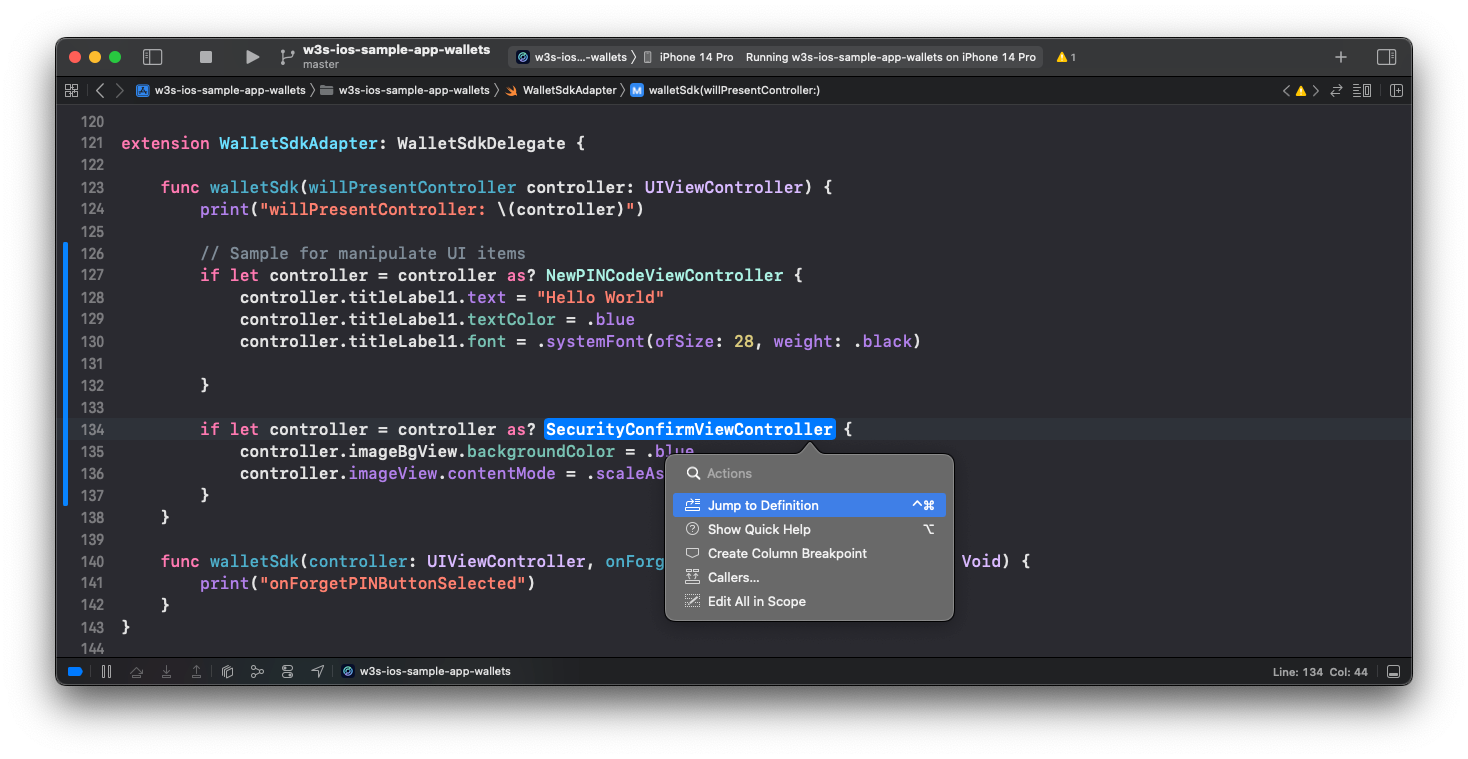
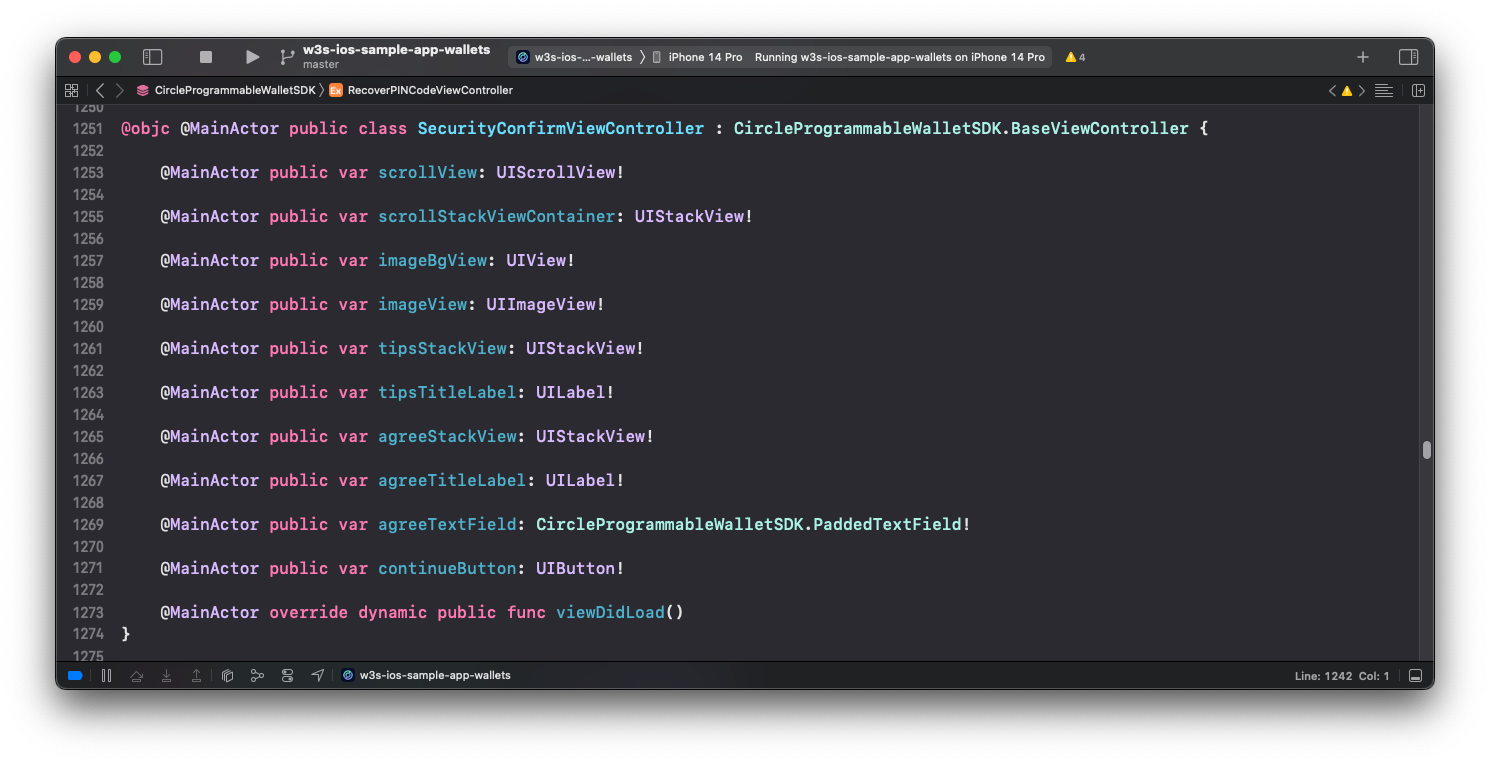
Use Jump to Definition (Cmd + left click) to see the public interface of the
view controller. Change the UI items as you need.
Jump to Definition
Public Interface
ErrorMessenger
ApiError Interface
Swift
public struct ApiError: Error {

    public let errorCode: ErrorCode

    /// Error string from the SDK
    public let errorString: String

    /// Error string for UI display
    public var displayString: String
}
ErrorMessenger, you can customize the ApiError messages.
Your customization replaces the default ApiError.displayString for UI usage.
You can also manage the localized error message.
Swift
public protocol ErrorMessenger {

    func getErrorString(_ code: ApiError.ErrorCode) -> String?
}
Example Code
Swift
import CircleProgrammableWalletSDK

class MyErrorMessenger: ErrorMessenger {

    func getErrorString(_ code: ApiError.ErrorCode) -> String? {
        switch code {
        case .hintsMatchAnswers:
            return "Your custom error message."

        case .networkError:
            return "Your custom error message."

        default:
            return nil
        }
    }
}

// ============ setErrorMessenger ============

WalletSdk.shared.setErrorMessenger(MyErrorMessenger())
ErrorCode and Messages Table
The following table shows theApiError.ErrorCode key names and their default
values:
| ApiError.ErrorCode | Default Value |
|---|---|
| unknown(-1) | Unknown error |
| success(0) | Success |
| apiParameterMissing(1) | API parameter missing |
| apiParameterInvalid(2) | API parameter invalid |
| forbidden(3) | Forbidden |
| unauthorized(4) | Unauthorized |
| retry(9) | Retry |
| customerSuspended(10) | Customer suspended |
| pending(11) | Pending |
| invalidSession(12) | Invalid session |
| invalidPartnerId(13) | Invalid partner ID |
| invalidMessage(14) | Invalid Message published to a SQS queue. |
| invalidPhone(15) | Invalid phone number %@ |
| walletIdNotFound(156001) | <server definition> |
| tokenIdNotFound(156002) | <server definition> |
| transactionIdNotFound(156003) | <server definition> |
| entityCredentialNotFound(156004) | <server definition> |
| walletSetIdNotFound(156005) | <server definition> |
| userAlreadyExisted(155101) | user already existed |
| userNotFound(155102) | user not found |
| userTokenNotFound(155103) | user token not found |
| userTokenExpired(155104) | user token expired |
| invalidUserToken(155105) | invalid user token |
| userWasInitialized(155106) | user was initialized |
| userHasSetPin(155107) | user has set pin |
| userHasSetSecurityQuestion(155108) | user has set security question |
| userWasDisabled(155109) | user was disabled |
| userDoesNotSetPinYet(155110) | user does not set pin yet |
| userDoesNotSetSecurityQuestionYet(155111) | user does not set security questions yet |
| incorrectUserPin(155112) | The PIN you entered is incorrect. You have %@ attempts left. |
| incorrectDeviceId(155113) | incorrect device id |
| incorrectAppId(155114) | app id not found |
| incorrectSecurityAnswers(155115) | The answers you entered are incorrect. You have %@ attempts left. |
| invalidChallengeId(155116) | invalid challenge id |
| invalidApproveContent(155117) | invalid approve content |
| invalidEncryptionKey(155118) | invalid encryption key |
| userPinLocked(155119) | You’ve used up all PIN attempts. Please wait for %@ mins to retry later. |
| securityAnswersLocked(155120) | The answers you entered are incorrect. Please wait for %@ mins to retry again. |
| walletIsFrozen(155501) | Wallet is Frozen |
| maxWalletLimitReached(155502) | Max wallet limit reached |
| walletSetIdMutuallyExclusive(155503) | WalletSetId can not be used together with blockchain and address filter |
| metadataUnmatched(155504) | metadata array length does not match wallet count |
| userCanceled(155701) | User canceled |
| launchUiFailed(155702) | <Launch UI failed reason> |
| pinCodeNotMatched(155703) | The PIN you entered is not the same as the first one. |
| insecurePinCode(155704) | Your PIN can’t have repeating or consecutive numbers. |
| hintsMatchAnswers(155705) | Your hint can’t be the same as the answer. |
| networkError(155706) | Network error |
| biometricsSettingNotEnabled(155708) | Biometrics is disabled |
| deviceNotSupportBiometrics(155709) | System doesn’t support biometrics |
| biometricsKeyPermanentlyInvalidated(155710) | (Android only) Failed to decrypt biometrics key |
| biometricsUserSkip(155711) | The user has not enabled biometrics yet |
| biometricsUserDisableForPin(155712) | The user refused to enable biometrics |
| biometricsUserLockout(155713) | (Android only) Too many requests. Try again later. |
| biometricsUserLockoutPermanent(155714) | Too many requests. The biometrics sensor on the device is locked. |
| biometricsUserNotAllowPermission(155715) | Biometrics is not permitted by the user. |
| biometricsInternalError(155716) | Unexpected error for biometrics: %@ |
| invalidUserSecret(155718) | User token format is invalid. Please ensure the format of the user token is correct, then perform login and execute the challenge again. |
| userTokenMismatch(155719) | User token and SDK API execute function do not match. Ensure that executeWithUserSecret is for users with SSO/Email auth method and execute is for users with PIN auth method. |
| socialLoginFailed(155720) | Social login is failed. The social provider returns failed during the execution of social login flow. Please refer to the error message for more details. |
| loginInfoMissing(155721) | Login info is missing. Please perform login and execute the challenge again. |
| walletIdNotFound(156001) | The specified wallet does not exist, or is not visible to the caller. Try the request again with a valid wallet ID. |
| tokenIdNotFound(156002) | The specified token does not exist, or is not visible to the caller. Try the request again with a valid token ID. |
| transactionIdNotFound(156003) | The specified transaction does not exist, or is not visible to the caller. Try the request again with a valid transaction ID. |
| entityCredentialNotFound(156004) | Reusing an entity secret ciphertext is not allowed. Please re-encrypt the entity secret to generate a new ciphertext and try again. |
| walletSetIdNotFound(156005) | The specified wallet set does not exist, or is not visible to the caller. Try the request again with a valid wallet set. |